Loading
Get Open Enrollment Application - Neola
How it works
-

Open form follow the instructions
-

Easily sign the form with your finger
-

Send filled & signed form or save
How to fill out the OPEN ENROLLMENT APPLICATION - Neola online
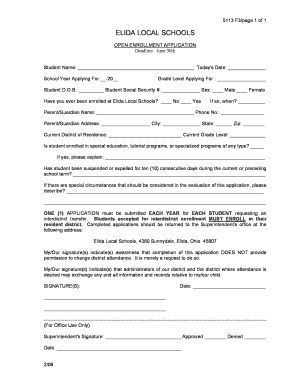
The OPEN ENROLLMENT APPLICATION - Neola is a crucial document for families seeking to enroll their children in the Elida Local Schools outside their current district. This guide provides a comprehensive overview of how to accurately complete the application online, ensuring a smooth enrollment process.
Follow the steps to successfully complete your application.
- Press the ‘Get Form’ button to access the application, opening it in your preferred editing interface.
- Begin by entering the student’s name in the designated field. Ensure correct spelling, as this information will be used throughout the enrollment process.
- Next, input today’s date in the appropriate section. This date will mark when the application is submitted.
- Specify the school year for which you are applying. Use the format '-20__' to indicate the academic year.
- Select the grade level for which the student is applying. Make sure this aligns with their age and educational needs.
- Enter the date of birth for the student in the designated field, ensuring accuracy for school records.
- Provide the student's social security number. This information is necessary for enrollment verification but may be optional depending on district policy.
- Indicate the student's sex by selecting either male or female in the provided options.
- Answer whether the student has ever been enrolled at Elida Local Schools by selecting 'No' or 'Yes.' If applicable, provide the date of previous enrollment.
- Fill in the parent or guardian’s name and phone number. This information is crucial for communication regarding the application and enrollment.
- Complete the parent or guardian’s address, ensuring to include the city, state, and zip code.
- Detail the current district of residence and the grade level that the student is presently in.
- Indicate if the student is enrolled in special education, tutorial programs, or any specialized programs, and provide explanations if necessary.
- Answer whether the student has been suspended or expelled for ten consecutive days during the current or preceding school term. Provide any relevant details.
- If there are any special circumstances that need consideration, please describe those in the section provided.
- Acknowledge that one application needs to be submitted each year for each student requesting an interdistrict transfer.
- Review all information entered for accuracy and completeness before submitting.
- Sign and date the application at the bottom, confirming awareness that submitting this application does not guarantee a change in district attendance.
- Submit the completed application to the Superintendent's office at Elida Local Schools, ensuring it is sent before the June 30th deadline.
- After submission, save any changes made to the document for your records, and consider downloading or printing a copy for personal reference.
Complete your OPEN ENROLLMENT APPLICATION - Neola online today and ensure a smooth transition for your child's educational journey.
Every spring, each school district in Ohio may choose whether or not to accept students through open enrollment for the next school year. This Open Enrollment Listing lists school districts by district name and whether or not they will accept applications for the 2022-23 school year.
Industry-leading security and compliance
US Legal Forms protects your data by complying with industry-specific security standards.
-
In businnes since 199725+ years providing professional legal documents.
-
Accredited businessGuarantees that a business meets BBB accreditation standards in the US and Canada.
-
Secured by BraintreeValidated Level 1 PCI DSS compliant payment gateway that accepts most major credit and debit card brands from across the globe.