Loading
Get Environmental Site Screening Questionnaire - City Of Waterloo
How it works
-

Open form follow the instructions
-

Easily sign the form with your finger
-

Send filled & signed form or save
How to fill out the Environmental Site Screening Questionnaire - City Of Waterloo online
Completing the Environmental Site Screening Questionnaire for the City of Waterloo is an important step in the development application process. This guide provides you with clear, step-by-step instructions to help you complete the form accurately and online.
Follow the steps to complete the questionnaire smoothly.
- Click ‘Get Form’ button to obtain the form and open it in your editor.
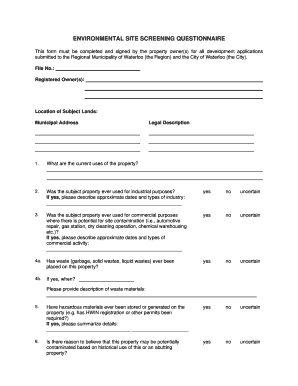
- Begin filling out the form by entering the File Number and the Registered Owner(s) of the property. This information is essential for identifying the development application.
- Provide the location of the subject lands including the municipal address and the legal description to ensure precise identification of the property.
- In section 1, indicate the current uses of the property. Be as detailed as possible.
- For questions 2 and 3, answer whether the subject property was ever used for industrial or commercial purposes. If the answer is 'yes', describe the types of activities and approximate dates.
- Proceed to question 4a to confirm if waste has been placed on the property. For question 4b, provide details about the waste materials if applicable.
- In question 5, state whether hazardous materials have ever been stored or generated on the property. Provide any necessary details if you answered 'yes'.
- Question 6 asks if there is any reason to believe the property may be potentially contaminated. If you suspect contamination, describe the nature.
- Continue with questions 7 to 10 to address agricultural operation history, storage tanks, water supply wells, and septic systems. Answer each thoroughly.
- Question 11 requires information about any environmental documents related to the property; kindly summarize any relevant assessments.
- For question 12, indicate if lands will be dedicated to the Region as part of the application.
- Complete the declaration section, signing and dating the form. Ensure the Commissioner of Oaths also signs this section.
- Once you have filled in all sections accurately, save your changes, and you can choose to download, print, or share the completed form as required.
Start completing your documents online to ensure a smooth application process.
Industry-leading security and compliance
US Legal Forms protects your data by complying with industry-specific security standards.
-
In businnes since 199725+ years providing professional legal documents.
-
Accredited businessGuarantees that a business meets BBB accreditation standards in the US and Canada.
-
Secured by BraintreeValidated Level 1 PCI DSS compliant payment gateway that accepts most major credit and debit card brands from across the globe.