Loading
Get Lifeguard Application Form
How it works
-

Open form follow the instructions
-

Easily sign the form with your finger
-

Send filled & signed form or save
How to fill out the Lifeguard Application Form online
Completing the Lifeguard Application Form online is a straightforward process that requires careful attention to detail. This guide will assist you in navigating each section of the form to ensure your submission is complete and accurate.
Follow the steps to successfully complete your application.
- Click ‘Get Form’ button to obtain the form and open it in the editor.
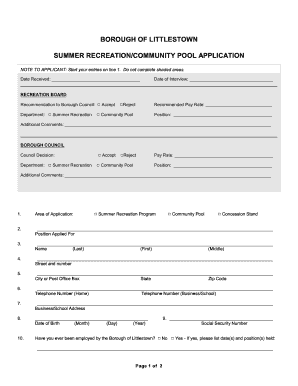
- Begin by filling out your application from line 1, avoiding the shaded areas that are not for applicant completion. Carefully read the instructions provided on the form to ensure compliance.
- Indicate the area of application by selecting the appropriate position, such as 'Summer Recreation' or 'Community Pool,' in the designated fields.
- Enter your name by providing your last, first, and middle names as required in the respective fields.
- Provide your complete address, ensuring to include the street number, city, state, and zip code.
- Fill in your contact information by entering your home and business or school telephone numbers.
- List your business or school address, if applicable, in the specified field.
- Enter your date of birth by specifying the month, day, and year in the designated section.
- State whether you have ever been employed by the Borough of Littlestown, and provide details if applicable, including dates and positions held.
- Provide your social security number in the respective field.
- List any prior experience that qualifies you for the position you are applying for in the space provided.
- Indicate if you have the necessary certifications, such as First Aid/CPR or Lifeguard Training, and include the expiration dates when applicable. Remember to attach copies of your certificates.
- Confirm whether you hold a PA State Police Criminal Record Check.
- If applying for a Community Pool position, provide your availability for the operation period and specify any dates or times you may not be available.
- Finally, sign and print your name in the designated areas and enter the date of your application to complete the form.
- Once you have filled out all sections appropriately, review your application to ensure all information is accurate. You can then save the changes, download a copy, print, or share the completed form if necessary.
Complete your Lifeguard Application Form online today and take the first step towards a rewarding summer position.
Related links form
Skills and qualities Life-saving skills. Good physical fitness and stamina. An interest in swimming and the ability to swim well. Good people skills and the ability to supervise. Awareness of health and safety procedures. Alertness and a sense of responsibility. The ability to remain calm and act appropriately in an emergency.
Industry-leading security and compliance
US Legal Forms protects your data by complying with industry-specific security standards.
-
In businnes since 199725+ years providing professional legal documents.
-
Accredited businessGuarantees that a business meets BBB accreditation standards in the US and Canada.
-
Secured by BraintreeValidated Level 1 PCI DSS compliant payment gateway that accepts most major credit and debit card brands from across the globe.