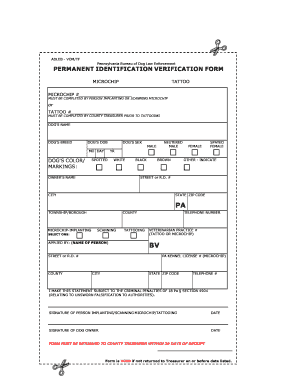
Print Form ADLEB - VOM/TF Pennsylvania Bureau of Dog Law Enforcement PERMANENT IDENTIFICATION VERIFICATION FORM MICROCHIP TATTOO MUST BE COMPLETED BY PERSON IMPLANTING OR SCANNING MICROCHIP or DOG S NAME DOG S BREED DOG S DOB MO DAY DOG S COLOR/ MARKINGS DOG S SEX NEUTERED MALE FEMALE SPAYED YR SPOTTED WHITE BLACK OWNER S NAME BROWN OTHER - INDICATE STREET or R.D. CITY STATE ZIP CODE PA TOWNSHIP/BOROUGH MICROCHIP-IMPLANTING COUNTY SCANNING SELECT.

How it works
  • Open form

    Open form follow the instructions

  • Easily sign form

    Easily sign the form with your finger

  • Share form

    Send filled & signed form or save

How to fill out the Identification Verification Form online

Completing the Identification Verification Form online ensures that your dog's identification is accurately recorded and registered. This guide provides step-by-step instructions to help you fill out the form correctly, ensuring that all necessary details are submitted effectively.

Follow the steps to complete the Identification Verification Form with ease.

  1. Click ‘Get Form’ button to acquire the form and launch it in your editing interface.
  2. Begin by providing the microchip number or tattoo number, as applicable. Ensure you input accurate details to avoid any identification errors. The microchip number must be completed by the person implanting or scanning the microchip, while the tattoo number must be filled in by the county treasurer prior to tattooing.
  3. Next, fill in the dog's name, breed, date of birth (DOB), color, and markings. Make sure to specify any distinct features that will help identify your dog.
  4. Indicate the sex of your dog by selecting either male or female. If applicable, also indicate whether your dog has been neutered or spayed.
  5. Provide the owner's name, complete address (street or road number, city, state, and ZIP code), and the township or borough information.
  6. Select the appropriate option for microchip implanting or tattooing. Fill in the required details, including the name of the person applying the microchip or tattoo, their address, and their telephone number.
  7. Fill in the veterinarian practice number and the Pennsylvania kennel license number, if applicable.
  8. Acknowledge the statement regarding penalties for unsworn falsification by signing in the designated area for the person implanting or scanning the microchip or tattooing, as well as the dog's owner. Include the dates next to each signature.
  9. After completing all sections, review your entries for accuracy. Save your changes, and then you can download, print, or share the completed form as needed. Ensure that the form is returned to the county treasurer within 30 days of receipt to avoid it being void.

Complete your documents online efficiently and ensure your dog's identification is well recorded.

Get form

Experience a faster way to fill out and sign forms on the web. Access the most extensive library of templates available.

Related content

Form I-9 Acceptable Documents | USCIS

Dec 10, 2020 — Employees must provide documentation to their employers to show their...

Learn more
Form I-9 Acceptable Documents | USCIS

Dec 10, 2020 — Employees must provide documentation to their employers to show their...

Learn more
Social Security number - Wikipedia

The SSN is frequently used by those involved in identity theft, since it is interconnected...

Learn more
Questions & Answers

Get answers to your most pressing questions about US Legal Forms API.

Contact support

Who do I call to verify my identity?

If you cannot verify your identity online, you can contact the IRS at 1-800-830-5084 from 7:00am - 7:00pm. You have a better chance of reaching the IRS if you call early in the morning.

Acceptable Documents for Identity Verification State identification (ID) card. Driver license. US passport or passport card. US military card (front and back) Military dependent's ID card (front and back) Permanent Resident Card. Certificate of Citizenship. Certificate of Naturalization.

6 Identity Verification Methods Knowledge-based authentication. Two-factor authentication. Credit bureau-based authentication. Database methods. Online verification. Biometric verification.

ID document verification plays an essential role in new bank account opening, onboarding, and financial agreement processes. Document verification is a digital identity verification method used to check whether an applicant's ID document (e.g. passport, ID card, driver's license, etc.) is legitimate.

Requirements for identity verification Your State-Issued ID. You can upload a photo of your ID by phone or by computer. Don't have a state issued ID? Social Security number. Your phone number. If we can't verify your phone number, you can verify by mail instead which takes approximately 3-7 business days.

Photo Identification State identification (ID) card. Driver license. US passport or passport card. US military card (front and back) Military dependent's ID card (front and back) Permanent Resident Card. Certificate of Citizenship. Certificate of Naturalization.

Get This Form Now!

Use professional pre-built templates to fill in and sign documents online faster. Get access to thousands of forms.

If you believe that this page should be taken down, please follow our DMCA take down process here.

Get Identification Verification Form