Loading
Form preview
  • US Legal Forms
  • Other Templates
  • More Forms
  • More Uncategorized Forms
  • Refund Request Form - City Of Springfield, Ohio - Ci Springfield Oh

Get Refund Request Form - City Of Springfield, Ohio - Ci Springfield Oh

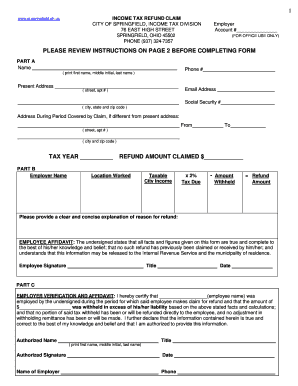
1 INCOME TAX REFUND CLAIM CITY OF SPRINGFIELD, INCOME TAX DIVISION 76 EAST HIGH STREET SPRINGFIELD, OHIO 45502 PHONE (937) 324-7357 www.ci.springfield.oh.us Employer Account # (FOR OFFICE USE ONLY).

How it works

  1. Open form

    Open form follow the instructions

  2. Easily sign form

    Easily sign the form with your finger

  3. Share form

    Send filled & signed form or save

How to fill out the Refund Request Form - City of Springfield, Ohio online

Filing a refund request for income tax in Springfield, Ohio, is a straightforward process when using the online Refund Request Form. This guide provides clear instructions to help you navigate the form, ensuring all necessary information is accurately completed.

Follow the steps to successfully complete the refund request form.

  1. Click ‘Get Form’ button to access the Refund Request Form and open it in your preferred online editor.
  2. In Part A, enter your name, phone number, and present address, including street, apartment number, city, state, and zip code. Be sure to provide your email address and social security number.
  3. If your address during the period covered by the claim is different from your present address, fill in that information under the designated section, including dates and specific address details.
  4. Indicate the tax year for which you are claiming the refund.
  5. In Part B, fill in your employer's name and the refund amount you are claiming. Also, complete the taxable city income calculations, clearly showing tax due and the amount withheld to determine your refund amount.
  6. Provide a concise explanation of the reason for your refund in the designated area.
  7. In the employee affidavit section, sign and date the form, confirming that all provided information is accurate and complete.
  8. If applicable, have an authorized officer or agent from your employer complete Part C, signing and dating the verification section.
  9. Ensure all parts of the form are filled out completely. Review the instructions if needed, as incomplete claims cannot be processed.
  10. Once you have completed the form, save your changes or download it. You may also choose to print or share the form as necessary.

Start filling out your refund request form online today for a seamless refund process!

Get form

Experience a faster way to fill out and sign forms on the web. Access the most extensive library of templates available.
Get form

Related content

Taxes - City of Springfield
Access to Income Tax information, forms, ordinances and online Tax Portal and ... There...
Learn more
THE INDUSTRIAL DEVELOPMENT OF SPRINGFIELD, OHIO...
of Springfield, Ohio, ranking ninth among Ohio cities on the basis of value...
Learn more
Cincinnati - Wikipedia
Cincinnati is a major city in the U.S. state of Ohio and the government seat of Hamilton...
Learn more

Related links form

Ap Biology 2003 Form B Michigan New Hire Form University Of Michigan Veterans Certification Request Form - Vets Umich Donor Record Form Mardigian Library The University Of Michigan ...

Questions & Answers

Get answers to your most pressing questions about US Legal Forms API.

Contact support

The IRS warned back in November 2022 that “refunds may be smaller in 2023” for various reasons, including the lack of economic impact payments last year and the greater difficulty around deducting charitable contributions.

How to Make a Refund Re-issue Request Online Log in to the income tax portal: .incometax.gov.in. Click on 'Services' tab and select 'Refund Reissue' from the drop-down menu.

To complete a Form 3911, you will need to provide the following information: Inquiry date. Tax return year. Refund amounts. Refund dates. Check or direct deposit. Status: U.S. Postal Service returned check because they could not deliver it. ... Section I. Name. ... Section II - Refund Information.

Regardless of income type or final liability, all residents 18 years of age and older are required to file an annual City of Springfield Income Tax Return.

Logon to 'e-Filing' Portal https://.incometax.gov.in/iec/foportal/​ Go to the 'My Account' > Click 'Service Request' > Select the 'Request Type' as 'View Request' and Select the 'Request Category' as 'Refund Reissue'

Logon to 'e-Filing' Portal https://.incometax.gov.in/iec/foportal/​...How to Request for Refund Re-issue (in case of refund failure)? Click on 'My Account' menu and click 'Service Request' link. Select the 'Request Type' as 'New Request' and Select the 'Request Category' as 'Refund Reissue'.

You can also check the status of your refund by calling the Ohio Refund Hot Line at 1-800-282-1784. If you request a direct deposit for an original return, you can expect your OH refund within 15 business days. Paper returns will take approximately eight to 10 weeks to process.

Get This Form Now!

Use professional pre-built templates to fill in and sign documents online faster. Get access to thousands of forms.
Get form
If you believe that this page should be taken down, please follow our DMCA take down processhere.
Get Refund Request Form - City Of Springfield, Ohio - Ci Springfield Oh
Get form
  • Adoption
  • Bankruptcy
  • Contractors
  • Divorce
  • Home Sales
  • Employment
  • Identity Theft
  • Incorporation
  • Landlord Tenant
  • Living Trust
  • Name Change
  • Personal Planning
  • Small Business
  • Wills & Estates
  • Packages A-Z
  • Affidavits
  • Bankruptcy
  • Bill of Sale
  • Corporate - LLC
  • Divorce
  • Employment
  • Identity Theft
  • Internet Technology
  • Landlord Tenant
  • Living Wills
  • Name Change
  • Power of Attorney
  • Real Estate
  • Small Estates
  • Wills
  • All Forms
  • Forms A-Z
  • Other Templates
  • Legal Hub
  • About Us
  • Help Portal
  • Legal Resources
  • Blog
  • Affiliates
  • Contact Us
  • Delete My Account
  • Site Map
  • Industries
  • Forms in Spanish
  • Localized Forms
  • State-specific Forms
  • Forms Kit
  • Real Estate Handbook
  • All Guides
  • Notarize
  • Incorporation services
  • For Consumers
  • For Small Business
  • For Attorneys
  • USLegal
  • FormsPass
  • pdfFiller
  • signNow
  • altaFlow
  • DocHub
  • Instapage
Form Packages
  • Adoption
  • Bankruptcy
  • Contractors
  • Divorce
  • Home Sales
  • Employment
  • Identity Theft
  • Incorporation
  • Landlord Tenant
  • Living Trust
  • Name Change
  • Personal Planning
  • Small Business
  • Wills & Estates
  • Packages A-Z
Form Categories
  • Affidavits
  • Bankruptcy
  • Bill of Sale
  • Corporate - LLC
  • Divorce
  • Employment
  • Identity Theft
  • Internet Technology
  • Landlord Tenant
  • Living Wills
  • Name Change
  • Power of Attorney
  • Real Estate
  • Small Estates
  • Wills
  • All Forms
  • Forms A-Z
  • Other Templates
Customer Service
  • Legal Hub
  • About Us
  • Help Portal
  • Legal Resources
  • Blog
  • Affiliates
  • Contact Us
  • Delete My Account
  • Site Map
  • Industries
  • Forms in Spanish
  • Localized Forms
  • State-specific Forms
  • Forms Kit
Legal Guides
  • Real Estate Handbook
  • All Guides
Prepared for you
  • Notarize
  • Incorporation services
Our Customers
  • For Consumers
  • For Small Business
  • For Attorneys
Our Sites
  • USLegal
  • FormsPass
  • pdfFiller
  • signNow
  • altaFlow
  • DocHub
  • Instapage
Social Media
Call us now toll free:
+1 833 426 79 33
As seen in:
© Copyright 1999-2026 airSlate Legal Forms, Inc. 17 Station Street, Ste. 203, Brookline, MA 02445
  • Your Privacy Choices
  • Terms of Service
  • Privacy Notice
  • Content Takedown Policy
  • Bug Bounty Program