Loading
Get Intake And Referral Form
How it works
-

Open form follow the instructions
-

Easily sign the form with your finger
-

Send filled & signed form or save
How to fill out the Intake And Referral Form online
Completing the Intake And Referral Form online is an important step in accessing necessary services. This guide provides clear instructions to help you navigate each section of the form effectively.
Follow the steps to successfully complete the form online.
- Press the ‘Get Form’ button to access the Intake And Referral Form and open it in your browser.
- Fill in the date at the top of the form. This helps to identify when the form was completed.
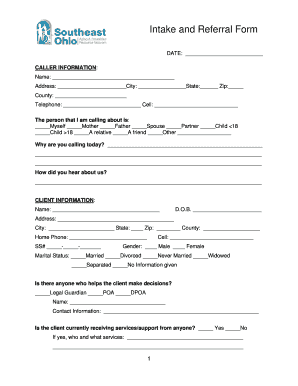
- In the caller information section, provide your name, address, city, state, zip code, county, and contact numbers, ensuring all details are accurate.
- Indicate who you are calling about by selecting the appropriate option, such as yourself, a family member, or friend.
- Explain the reason for your call in the designated area, providing any necessary details that can assist in processing.
- Document how you heard about the services, as this may help the organization understand outreach and communication channels.
- Proceed to the client information section, where you will enter the client's name, date of birth, address, city, state, zip code, county, and phone numbers.
- Select the client’s gender and marital status from the dropdown options available.
- If applicable, provide the name and contact information of anyone who helps the client make decisions, such as a legal guardian.
- Indicate whether the client is currently receiving any services or support, and specify who is providing these services.
- Fill out the client living arrangements by selecting appropriate options that apply to the client’s current living status.
- Provide health information regarding the client's care needs and any disabilities they may have, using the checklist provided.
- Complete the activities of daily living section by indicating how the client manages various tasks.
- Provide details about the client’s medical insurance coverage, including Medicare, Medicaid, or private insurance.
- Indicate any benefits the client is currently receiving, checking all that apply.
- Document if the client is enrolled in any waiver services or funding sources.
- Provide the client’s employment status and monthly gross income in the appropriate fields.
- Answer if you are giving verbal release of information for the physician or other agencies, and include necessary contact details.
- In the outcome section, note any assessments scheduled and details regarding caregiver availability.
- Finally, review all completed information for accuracy and completeness, then save changes, download the form, print it, or share your submission as required.
Complete your Intake And Referral Form online today for timely access to essential services.