Loading
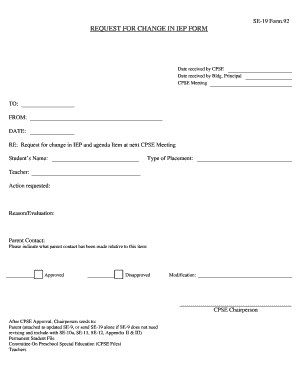
Get Request For Change In Iep Form - Co Essex Ny
How it works
-

Open form follow the instructions
-

Easily sign the form with your finger
-

Send filled & signed form or save
How to fill out the REQUEST FOR CHANGE IN IEP FORM - Co Essex Ny online
Filling out the Request for Change in IEP Form is a crucial step in advocating for a student's educational needs. This comprehensive guide provides clear, step-by-step instructions to help you successfully navigate the process online.
Follow the steps to complete the form efficiently.
- Click the ‘Get Form’ button to access the form and open it in your preferred online editor.
- Enter the name of the school district at the top of the form where indicated.
- Input the date received by the Committee on Preschool Special Education (CPSE) in the designated field.
- Fill in the date received by the building principal, ensuring accuracy.
- Select the date of the upcoming CPSE meeting.
- In the 'TO' section, identify the recipient of the request.
- In the 'FROM' section, add your name or the name of the person submitting the form.
- Complete the date field to indicate when you are submitting the request.
- Fill in the student's name to specify whose IEP is being changed.
- Indicate the type of placement relevant to the student’s IEP.
- Provide the name of the student’s teacher.
- Clearly state the action you are requesting concerning the IEP.
- Explain the reason for the request and any evaluations that support this change.
- Document any parent contact that has been made regarding this change by indicating the details.
- After filled out the form, review your entries for accuracy and completeness.
- Upon final review, save your changes, then proceed to download, print, or share the form as needed.
Complete your documents online to ensure your advocacy efforts are efficiently managed.
Industry-leading security and compliance
US Legal Forms protects your data by complying with industry-specific security standards.
-
In businnes since 199725+ years providing professional legal documents.
-
Accredited businessGuarantees that a business meets BBB accreditation standards in the US and Canada.
-
Secured by BraintreeValidated Level 1 PCI DSS compliant payment gateway that accepts most major credit and debit card brands from across the globe.