Loading
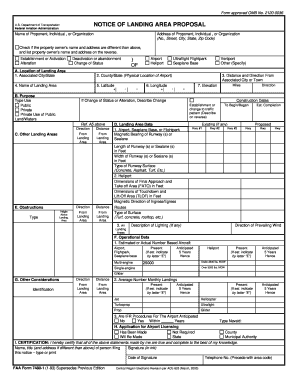
Get Notice Of Landing Area Proposal - Missouri Department Of ... - Modot
How it works
-

Open form follow the instructions
-

Easily sign the form with your finger
-

Send filled & signed form or save
How to fill out the NOTICE OF LANDING AREA PROPOSAL - Missouri Department Of ... - Modot online
Filling out the Notice of Landing Area Proposal form is an essential step for anyone looking to establish or modify a landing area in Missouri. This guide provides a comprehensive overview of the form's sections and fields, offering clear and supportive instructions for completing it online.
Follow the steps to complete the form accurately and efficiently.
- Click ‘Get Form’ button to obtain the form and open it in your preferred editor.
- Fill in the name of the proponent, which may be an individual or organization. Include the complete address, including the street, city, state, and zip code.
- If the property owner's name and address differ from the proponent's information, check the appropriate box and provide the necessary details on the reverse side.
- In section A, select the establishment or activation type, including whether it is an airport, heliport, or other landing areas. Specify the associated city and state where the landing area is located.
- Provide the county and physical location of the airport, the name of the landing area, and its latitude and longitude coordinates. Include the distance and direction from the associated city or town.
- Indicate the purpose of the landing area by selecting from the options provided: public, private, or private use of public land/waters.
- Complete section D, where you will report on the landing area data, including runway dimensions, surface types, and existing conditions if applicable.
- In section E, detail any obstructions affecting the landing area, including their height, distance, and type.
- Proceed to section F to note the estimated or actual number of based aircraft, along with the anticipated figures for the next five years across various aircraft types.
- Ensure the certification section is completed with the name, title, signature, and contact information of the individual filing the notice.
- Once all sections of the form are completed, you can save changes, download, print, or share the form as needed.
Complete your forms online today and ensure regulatory compliance for your landing area proposal.
Call 1-866-831-6277 for assistance from 7:30 am to 4 pm, CT, Mon. - Fri. Make an appointment for an in-person visit up to 30 days in advance by sending an email to contactMCS@modot.mo.gov with the subject line "In-person appointment request," or call us at the number above and choose Option 7.
Industry-leading security and compliance
US Legal Forms protects your data by complying with industry-specific security standards.
-
In businnes since 199725+ years providing professional legal documents.
-
Accredited businessGuarantees that a business meets BBB accreditation standards in the US and Canada.
-
Secured by BraintreeValidated Level 1 PCI DSS compliant payment gateway that accepts most major credit and debit card brands from across the globe.