Loading
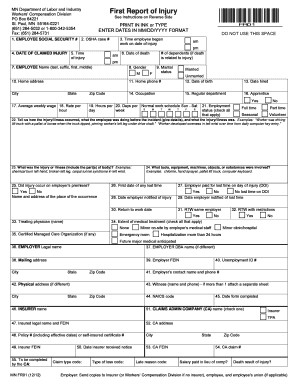
Get First Report Of Injury - Minnesota Department Of Labor And Industry - Lmc
How it works
-

Open form follow the instructions
-

Easily sign the form with your finger
-

Send filled & signed form or save
How to fill out the First Report Of Injury - Minnesota Department Of Labor And Industry - Lmc online
Filing the First Report of Injury is a crucial step in ensuring that workers' compensation claims are processed efficiently. This guide will provide you with clear, step-by-step instructions on how to fill out the form accurately online, making the process as straightforward as possible.
Follow the steps to complete the First Report of Injury form online.
- Click ‘Get Form’ button to obtain the form and open it in your editing tool.
- Begin by entering the employee's social security number in the first field.
- Input the OSHA case number, if applicable, in the designated field.
- Provide the date of the claimed injury and the time it occurred, specifying am or pm.
- Note the time the employee began work on the date of the injury.
- Fill in the employee's name including last name, suffix, first name, and middle initial.
- Indicate the employee's gender by selecting the appropriate option.
- Enter the complete home address of the employee, including city, state, and zip code.
- Specify the average weekly wage and rate per hour of the employee.
- Provide information on the number of dependents if the injury resulted in death.
- If applicable, provide the date of death related to the injury.
- Complete the section detailing how the injury or illness occurred, including the specifics of the situation.
- Describe the injury or illness in detail, specifying the affected parts of the body.
- List any tools, equipment, machines, or substances involved in the incident.
- Indicate whether the injury occurred on the employer's premises.
- Document the first date of any lost time related to the injury.
- Confirm if the employer paid for lost time on the date of injury.
- Input the date the employer was notified of the injury.
- Specify the date the employer was notified of any lost time.
- Fill in the expected return to work date if applicable, or leave it blank if the employee has not yet returned.
- Indicate the extent of medical treatment the employee received.
- Provide the employer's legal name and doing business as (DBA) name, if different.
- Complete the mailing and physical address of the employer.
- Fill in the employer's Federal Employer Identification Number (FEIN) and Unemployment ID number.
- Complete the sections related to the insurer and claims administrator, ensuring all necessary details are provided.
- Upon reviewing for accuracy, save the changes, download a copy, print the form, or share it as needed.
Start filling out your documents online to ensure an efficient claims process.
Related links form
The Employer's Report of Occupational Injury or Illness (Form 5020). Every employer is required to file a complete report of every occupational injury or illness to each employee which results in lost time beyond the date of injury or illness or which requires medical treatment beyond first aid*.
Industry-leading security and compliance
US Legal Forms protects your data by complying with industry-specific security standards.
-
In businnes since 199725+ years providing professional legal documents.
-
Accredited businessGuarantees that a business meets BBB accreditation standards in the US and Canada.
-
Secured by BraintreeValidated Level 1 PCI DSS compliant payment gateway that accepts most major credit and debit card brands from across the globe.