Loading
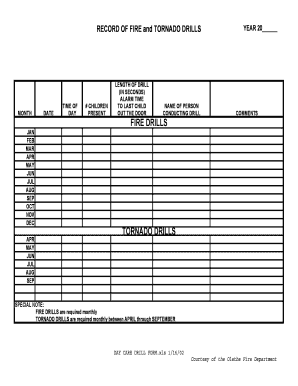
Get Day Care Drill Form.xls
How it works
-

Open form follow the instructions
-

Easily sign the form with your finger
-

Send filled & signed form or save
How to fill out the DAY CARE DRILL FORM.xls online
Filling out the DAY CARE DRILL FORM is an essential task for ensuring safety in day care facilities. This guide provides clear instructions to help users confidently complete the form online, ensuring all necessary information is captured accurately.
Follow the steps to complete the DAY CARE DRILL FORM online.
- Click the ‘Get Form’ button to access the form and open it in your selected editor.
- Begin by entering the month and year at the top of the form. This will help categorize the drills by date.
- For each drill conducted, fill in the date and time of day when the drill occurred. This is crucial for record-keeping and compliance.
- In the '# Children Present' field, indicate how many children were present during the drill. This number is vital for assessing safety measures.
- Record the length of the drill in seconds. This will provide an overview of how effective the evacuation process was.
- Note the alarm time to the last child out the door. This metric helps in analyzing response times.
- Fill in the name of the person conducting the drill to ensure accountability and proper oversight.
- Include any comments that might be relevant to the drill. This could cover observations or notes for future improvements.
- Once all fields are filled out accurately, you can choose to save your changes, download, print, or share the completed form as needed.
Complete your day care drill submissions online efficiently and ensure the safety of your facilities.