Loading
Get Halton Hills Burn Permit
How it works
-

Open form follow the instructions
-

Easily sign the form with your finger
-

Send filled & signed form or save
How to fill out the Halton Hills Burn Permit online
This guide provides comprehensive instructions on completing the Halton Hills Burn Permit application online. The process is designed to be user-friendly, enabling all individuals to submit their burn permit requests effectively.
Follow the steps to complete your burn permit application online.
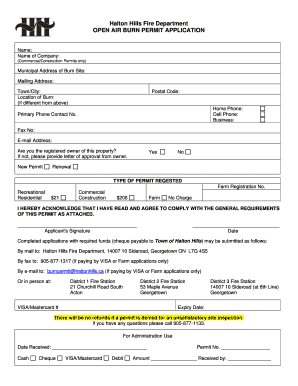
- Press the ‘Get Form’ button to obtain the Halton Hills Burn Permit application and open it in your preferred document editor.
- Begin filling out your personal information in the 'Name' field. This should be your full name or the name of the entity requesting the permit.
- If applicable, enter the name of the company in the 'Name of Company' field, which is required for commercial or construction permits.
- Provide the 'Municipal Address of Burn Site' where the burning will take place, ensuring all details are accurate and complete.
- If the location of the burn differs from the municipal address, specify the 'Location of Burn' in the designated section.
- Fill in the 'Mailing Address,' 'Town/City,' and 'Postal Code' fields to ensure correspondence reaches you.
- Input your contact information including 'Home Phone,' 'Cell Phone,' and 'Business' phone numbers where appropriate. Ensure that the primary contact number is clear.
- Indicate whether you are the registered owner of the property by selecting 'Yes' or 'No.' If you select 'No,' be prepared to provide a letter of approval from the owner.
- Choose whether you are applying for a 'New Permit' or a 'Renewal' as appropriate.
- Select the type of permit being requested from the available options, including 'Recreational,' 'Residential,' 'Commercial,' 'Construction,' and 'Farm,' noting the associated fees where applicable.
- Acknowledge that you have read and agree to comply with the general requirements of the permit by signing and dating the application.
- Once completed, save your changes. You have the option to download, print, or share the form as needed.
Complete and submit your Halton Hills Burn Permit application online today for a smooth processing experience.
The annual Burning Law bans open-air burning before 4 p.m. within 300 feet of the woods or dry grass. However, burning is still allowed after 4 p.m. with proper precautions, and open burnings are permitted if they are more than 300 feet away from the woods or flammable grass.
Industry-leading security and compliance
US Legal Forms protects your data by complying with industry-specific security standards.
-
In businnes since 199725+ years providing professional legal documents.
-
Accredited businessGuarantees that a business meets BBB accreditation standards in the US and Canada.
-
Secured by BraintreeValidated Level 1 PCI DSS compliant payment gateway that accepts most major credit and debit card brands from across the globe.