Loading
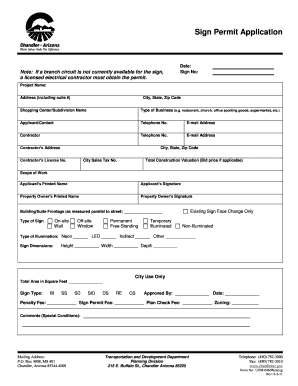
Get Sign Permit Application - City Of Chandler - Chandleraz
How it works
-

Open form follow the instructions
-

Easily sign the form with your finger
-

Send filled & signed form or save
How to fill out the Sign Permit Application - City Of Chandler - Chandleraz online
Filling out the Sign Permit Application online for the City of Chandler is a straightforward process. This guide will walk you through each section and field of the application, ensuring that you provide all the necessary information for a successful submission.
Follow the steps to complete your application accurately.
- Use the ‘Get Form’ button to access the Sign Permit Application. This will open the document in your selected editor for completion.
- Begin by filling in the date and your sign number at the top of the form. This identifies your application.
- Enter the project name and the complete address, including any suite number. This specifies where the sign will be installed.
- Fill in the city, state, and zip code where the sign project is located. This provides location clarity.
- If applicable, list the shopping center or subdivision name. This contextualizes the sign's placement.
- Specify the type of business related to the application, such as a restaurant or office. This categorizes your application for processing.
- Provide the applicant's contact information, including name, telephone number, and email address. This ensures the city can reach out if needed.
- List the contractor's details, including their name, telephone number, email address, and address. This information is crucial if work will be performed by a contractor.
- Indicate the contractor’s license number and city sales tax number. These numbers verify the contractor's legitimacy.
- State the total construction valuation or bid price if applicable, as this informs the city of the project’s financial scale.
- Describe the scope of work for the sign. Provide a clear outline of what the project includes.
- Have the applicant sign and print their name, and do the same for the property owner if different from the applicant. Signatures confirm agreement to the application.
- Measure and enter the building or suite frontage parallel to the street. This measurement is necessary for zoning and location purposes.
- Select the type of sign you are applying for. Make selections regarding whether it is on-site or off-site, permanent or temporary, illuminated or non-illuminated, etc.
- If applicable, indicate the type of illumination such as neon, LED, or other options.
- Provide the dimensions of the sign, including height, width, and depth. These measurements are crucial for compliance with city regulations.
- Complete any additional sections specified for city use only, such as total area in square feet and sign type.
- Review the application for completeness and accuracy before finalizing.
- Once you have filled out the form, save your changes, and download, print, or share the document as needed.
Complete your Sign Permit Application online to ensure a smooth process.
Building permits are required for all structures with the exception of a structure that is less than 200 square feet with no electrical, plumbing or mechanical.
Industry-leading security and compliance
US Legal Forms protects your data by complying with industry-specific security standards.
-
In businnes since 199725+ years providing professional legal documents.
-
Accredited businessGuarantees that a business meets BBB accreditation standards in the US and Canada.
-
Secured by BraintreeValidated Level 1 PCI DSS compliant payment gateway that accepts most major credit and debit card brands from across the globe.