Loading
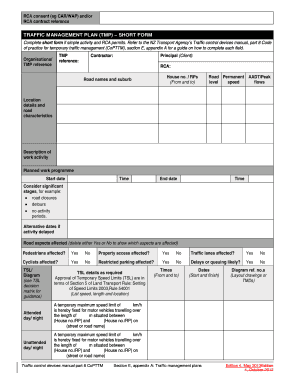
Get (tmp) Short Form With On-site Record - Tracked Changes - Nzta Govt
How it works
-

Open form follow the instructions
-

Easily sign the form with your finger
-

Send filled & signed form or save
How to fill out the (TMP) Short Form With On-site Record - Tracked Changes - Nzta Govt online
This guide provides comprehensive instructions on filling out the (TMP) Short Form With On-site Record for temporary traffic management. Designed to assist users of all experience levels, it outlines each section of the form to ensure clarity and compliance with the applicable guidelines.
Follow the steps to fill out the (TMP) Short Form effectively.
- Click the ‘Get Form’ button to access the form online and open it in your preferred editor.
- Begin filling out the first section, which includes the contractor information. Enter your details in the fields provided, ensuring accuracy in the TMP reference and contractor names.
- Next, you will need to provide details about the principal (client) and the RCA (road controlling authority). Ensure the names are properly spelled and correctly reflect the official documentation.
- Fill in the house numbers and road names, ensuring to note the suburb accurately. This section helps in identifying the exact location of the planned activities.
- Complete the section titled 'Location details and road characteristics.' Describe the road's permanent AADT (average annual daily traffic) and peak level speed flows as necessary.
- In the 'Description of work activity' section, succinctly describe the planned activities. This should include relevant dates and times for the expected work schedule.
- Indicate any potential impacts by marking 'Yes' or 'No' in response to whether pedestrians, property access, traffic lanes, cyclists, or restricted parking will be affected.
- Specify the temporary speed limits (TSL) required, providing details on the speed, location, and the lengths of those limits as applicable.
- Outline the contingency plan in case of unexpected delays or issues during the project. Include the necessary adjustments for unforeseen circumstances.
- Fill out the contact details section, ensuring that a reachable 24/7 contact number and relevant personnel information are included.
- Complete the approval section, indicating whether the TMP was prepared or approved, as applicable. Ensure all names, dates, and signatures are entered correctly.
- Lastly, review the entire form for completeness and accuracy. You can then save changes, download, print, or share the TMP as required.
Begin your document preparation online today to streamline your traffic management planning.
They are: • Road Controlling Authority (RCA) • Principal • Contractor. RCA. The RCA is the organisation that manages the roads.
Industry-leading security and compliance
US Legal Forms protects your data by complying with industry-specific security standards.
-
In businnes since 199725+ years providing professional legal documents.
-
Accredited businessGuarantees that a business meets BBB accreditation standards in the US and Canada.
-
Secured by BraintreeValidated Level 1 PCI DSS compliant payment gateway that accepts most major credit and debit card brands from across the globe.