Loading
Get R63n
How it works
-

Open form follow the instructions
-

Easily sign the form with your finger
-

Send filled & signed form or save
How to fill out the R63n online
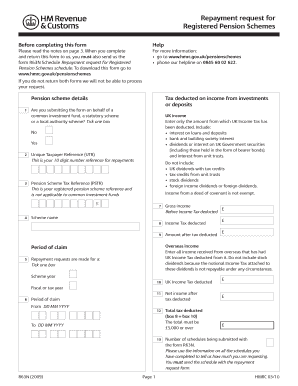
The R63n form is a key document used for requesting repayment of UK Income Tax that has been deducted from the investment income of registered pension schemes. This guide will provide you with clear, step-by-step instructions on how to accurately complete the R63n form online.
Follow the steps to complete the R63n form efficiently.
- Click ‘Get Form’ button to obtain the form and open it for editing.
- Begin filling in the pension scheme details, including whether you are submitting on behalf of a common investment fund, a statutory scheme, or a local authority scheme by ticking the appropriate box.
- Enter your Unique Taxpayer Reference (UTR), ensuring it is a 10-digit number for repayments.
- Provide the Pension Scheme Tax Reference (PSTR), which is applicable only to registered pension schemes, not common investment funds.
- Fill out sections regarding gross income and income tax deducted. Make sure to include only income from which UK Income Tax has been deducted.
- Complete the section for overseas income, if applicable, and include information on the period of claim, specifying dates clearly.
- Indicate whether you are making a repayment request for a scheme year or fiscal year by checking the correct box.
- Fill in who should receive the payment by ticking one of the options: the registered pension scheme, legal owner of the assets, or a nominee.
- If you selected 'nominee', provide the name of the nominee in the designated box.
- Sign the declaration confirming that all information provided is correct and complete. Include the date of signing.
- Review the filled form for accuracy and completeness before saving your changes, downloading, printing, or sharing the form as required.
Complete the R63n form online today to streamline your repayment request process.
Related links form
A Pension Scheme Tax Reference (PSTR) is the unique reference given to a scheme by HMRC when a scheme has been registered for tax relief and exemptions. It has 10 characters made up of 8 numbers followed by 2 letters. A scheme's PSTR is the one that evidences its status as a registered pension scheme.
Industry-leading security and compliance
US Legal Forms protects your data by complying with industry-specific security standards.
-
In businnes since 199725+ years providing professional legal documents.
-
Accredited businessGuarantees that a business meets BBB accreditation standards in the US and Canada.
-
Secured by BraintreeValidated Level 1 PCI DSS compliant payment gateway that accepts most major credit and debit card brands from across the globe.