Loading
Get Msf 4210
How it works
-

Open form follow the instructions
-

Easily sign the form with your finger
-

Send filled & signed form or save
How to fill out the Msf 4210 online
The Msf 4210 is an essential form for individuals seeking to replace a lost Certificate of Competency or Certificate of Equivalent Competency. This guide will provide you with clear, step-by-step instructions to complete the form accurately and efficiently.
Follow the steps to successfully complete the Msf 4210 online.
- Press the ‘Get Form’ button to access the form and open it for editing.
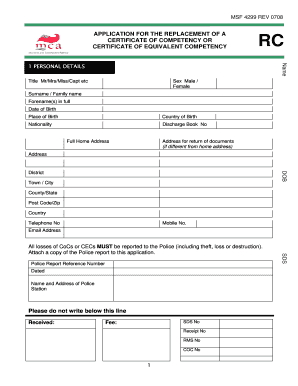
- Begin by filling out your personal details, including your title, sex, surname, forenames, date of birth, place of birth, country of birth, nationality, and discharge book number.
- Provide your full home address. If your address for document return differs, include that as well.
- Fill in your contact information, including your telephone number, mobile number, and email address.
- Input the police report reference number, the date of the report, and the name and address of the police station where the report was filed.
- Indicate the type of certificate that was lost (Certificate of Competency or Certificate of Equivalent Competency) and provide the certificate number. Also, specify whether you have lost either type of certificate before.
- State the grade of the certificate you are replacing and attach two passport size photographs as required.
- In the designated area, provide full details regarding the circumstances of the loss, including the date, place, time, and any witness contact details.
- Read the declaration carefully, then provide your signature and the date acknowledging the accuracy of the information provided.
- Ensure that all sections are completed, and review your entries for any potential errors.
- Once you are satisfied with the form, you can save your changes, download the completed document, print it for mailing, or share it as needed.
Complete your Msf 4210 online today to ensure a smooth processing experience.
1:04 2:28 How to Distribute in Math - YouTube YouTube Start of suggested clip End of suggested clip And then we do 8 times 4 which is 32 don't forget your sign. And then we add those two together 112.MoreAnd then we do 8 times 4 which is 32 don't forget your sign. And then we add those two together 112. You're done okay i could also do it this way say i didn't distribute i did 10 plus 4 is 14..
Industry-leading security and compliance
US Legal Forms protects your data by complying with industry-specific security standards.
-
In businnes since 199725+ years providing professional legal documents.
-
Accredited businessGuarantees that a business meets BBB accreditation standards in the US and Canada.
-
Secured by BraintreeValidated Level 1 PCI DSS compliant payment gateway that accepts most major credit and debit card brands from across the globe.