Loading
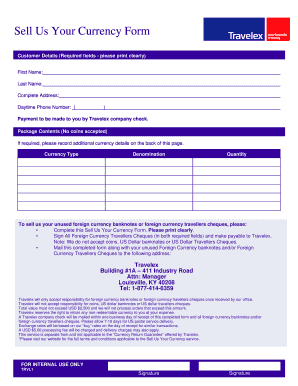
Get Travelex Claim Form Print
How it works
-

Open form follow the instructions
-

Easily sign the form with your finger
-

Send filled & signed form or save
How to fill out the Travelex Claim Form Print online
Filling out the Travelex Claim Form Print accurately is essential for successfully submitting your request. This guide provides step-by-step instructions to ensure you complete the form properly and avoid common mistakes.
Follow the steps to complete the Travelex Claim Form Print online:
- Click ‘Get Form’ button to access the form and open it in your preferred online editor.
- Begin by entering your customer details in the designated fields. Ensure that you print clearly, as this information is required. Include your first name, last name, complete address, and daytime phone number.
- In the ‘Package Contents’ section, indicate the currency type, denomination, and quantity of the foreign currency banknotes or travellers cheques you wish to sell. Remember, coins are not accepted.
- If additional currency details are needed, use the space provided on the back of the form to record these.
- For any foreign currency travellers cheques, make sure to sign in both required fields and ensure they are made payable to Travelex.
- After completing all sections, review your information for accuracy before submitting.
- You can then save your changes, download the completed form, and print it for mailing. Prepare to send the form along with your currency to Travelex at the specified address.
Complete your Travelex Claim Form Print online today to ensure your unused currency is processed efficiently.
Contact your insurer as soon as possible and ask them to send you a claim form. They may be able to email this to you to speed things up. Complete the claim form carefully and keep a copy for yourself. You'll need to include copies of all paperwork that will help your claim, including receipts or medical certificates.