Loading
Get 12064m-membership App.pdf - Bluecross Blueshield Of South ...
How it works
-

Open form follow the instructions
-

Easily sign the form with your finger
-

Send filled & signed form or save
How to fill out the 12064m-membership App.pdf - BlueCross BlueShield Of South Carolina online
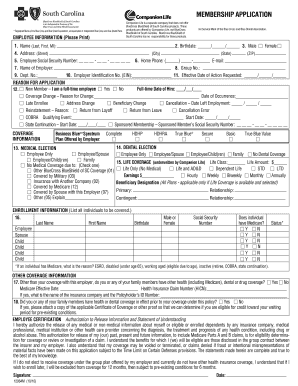
Filling out the 12064m-membership application form is a crucial step for individuals seeking membership with BlueCross BlueShield Of South Carolina. This guide will provide clear and concise instructions to help users complete the application online with confidence.
Follow the steps to complete your membership application seamlessly.
- Press the ‘Get Form’ button to access the membership application form and open it for editing.
- Begin by providing your personal information in the designated fields. This includes your name (last, first, middle initial), birthdate, and gender by selecting the appropriate option.
- Fill in your complete mailing address, including street, city, state, and zip code. Ensure accuracy for proper correspondence.
- Enter your employee social security number, home phone number, and email address in the corresponding fields.
- In the employee information section, list your employer's name, group number, department number, and employer identification number (EIN). Indicate your full-time hire date.
- Select the reason for your application by checking the appropriate boxes, such as whether you are a new member or if you are seeking a coverage change. Provide the date of occurrence if applicable.
- Proceed to the coverage information section, where you should select your medical and dental coverage options. Indicate if you are opting for employee only, employee/spouse, employee/child(ren), or family coverage.
- If applicable, detail your life coverage, including life class and the amount. Indicate the type of life and disability coverage you are seeking.
- List all individuals that will be covered under your plan, providing their last name, first name, birthdate, and social security number. Specify their relation to you and their Medicare status.
- If you or family members have other health or dental coverage, indicate this and provide the necessary details such as the name of the insurance company and the policyholder's ID number.
- Review the employee certification section, read the authorization to release information, and sign the application. Date the application to confirm completion.
- Finally, save your changes, download the completed form, print a copy for your records, or share your application as needed.
Complete your 12064m-membership application form online today and ensure your membership with BlueCross BlueShield Of South Carolina.
Alpha Prefix: YPO | BlueCross BlueShield of South Carolina.
Industry-leading security and compliance
US Legal Forms protects your data by complying with industry-specific security standards.
-
In businnes since 199725+ years providing professional legal documents.
-
Accredited businessGuarantees that a business meets BBB accreditation standards in the US and Canada.
-
Secured by BraintreeValidated Level 1 PCI DSS compliant payment gateway that accepts most major credit and debit card brands from across the globe.