Loading
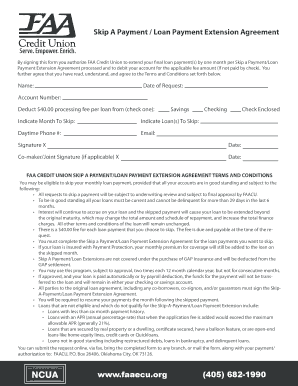
Get Faaecu Login
How it works
-

Open form follow the instructions
-

Easily sign the form with your finger
-

Send filled & signed form or save
How to fill out the Faaecu Login online
This guide provides step-by-step instructions for completing the Faaecu Login form online. By following these clear and user-friendly instructions, you can successfully fill out the form, ensuring all required information is included.
Follow the steps to fill out the Faaecu Login online.
- Click the ‘Get Form’ button to access the form and open it in your editor.
- Enter your name in the designated field.
- Provide the date of your request in the specified area.
- Input your account number in the appropriate field.
- Select your preferred payment deduction method by checking either the savings or checking option.
- Indicate the month you wish to skip your payment.
- List the loans that you would like to skip payments on in the designated section.
- Enter your daytime phone number and email address for any necessary communication.
- Review the terms and conditions outlined on the form to ensure understanding.
- Sign the form in the designated signature line and provide the date.
- If applicable, have a co-maker or joint signer add their signature and date in the appropriate section.
- Finally, save your changes to the form, and you can choose to download, print, or share the completed document.
Complete your forms online for a smooth and efficient process.
Become a Member at True Sky Credit Union The merged credit unions will maintain the True Sky name and Sean Cahill will act as the President and CEO for the combined organizations.