Loading
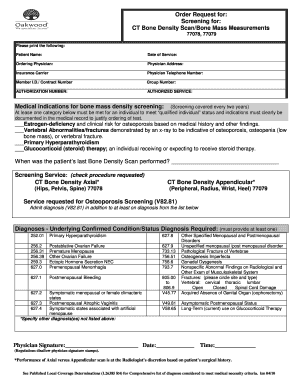
Get Lcd North Carolina Bone Density Form
How it works
-

Open form follow the instructions
-

Easily sign the form with your finger
-

Send filled & signed form or save
How to fill out the Lcd North Carolina Bone Density Form online
Completing the Lcd North Carolina Bone Density Form online can streamline the process of requesting a bone density scan. This guide provides clear instructions to help you accurately fill out each section of the form with confidence.
Follow the steps to accurately fill out the form
- Click ‘Get Form’ button to obtain the form and open it in the document editor.
- Enter the patient’s name in the designated field. Make sure to spell the name correctly to avoid any identification issues.
- Fill in the date of service in the appropriate section. This refers to the planned date for the bone density scan.
- Provide the ordering physician's name in the relevant area. This should be the medical professional responsible for the scan order.
- Complete the physician’s address accurately to ensure proper communication regarding the service.
- Select the insurance carrier by writing the name in the specified space. This is important for billing purposes.
- Input the physician's telephone number, ensuring it is correct for follow-ups.
- Fill in the member identification (ID) or contract number assigned by the insurance provider.
- Provide the group number, if applicable, in the designated field.
- Write the authorization number as provided by the insurance company, if required.
- Check the appropriate medical indications for the bone mass density screening. At least one category must be checked to qualify.
- Indicate when the patient’s last bone density scan was performed to provide relevant medical history.
- Select the screening service requested by checking the corresponding box for either CT Bone Density Axial or Appendicular.
- List any underlying confirmed conditions or statuses in the form of diagnosis codes provided.
- If applicable, indicate the type and site of any fractures by circling the correct options.
- Sign and date the form in the physician signature section. Note that stamps are not allowed.
- Once all information is filled accurately, save your changes. If necessary, download, print, or share the completed form as needed.
Start filling out your Lcd North Carolina Bone Density Form online today for a smooth submission process.
Calcium does not dissolve quickly and could show up in the scan. Getting your calcium intake through more natural means on the day of the exam is permitted and will not affect the scan. So, you can consume calcium-rich food and drinks, such as milk, yogurt and orange juice.