Loading
Get Julianne Kirkham
How it works
-

Open form follow the instructions
-

Easily sign the form with your finger
-

Send filled & signed form or save
How to fill out the Julianne Kirkham online
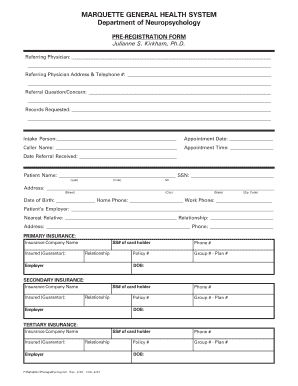
Filling out the Julianne Kirkham pre-registration form is essential for ensuring a smooth appointment process. This guide provides step-by-step instructions to help you complete the form accurately and efficiently.
Follow the steps to complete your pre-registration form.
- Click ‘Get Form’ button to access the pre-registration form and open it in your preferred editor.
- Begin by filling in the referring physician's name, address, and telephone number at the top of the form. Ensure that this information is complete and accurate to prevent any potential delays.
- Next, articulate the referral question or concern clearly in the designated field. Providing detailed information here can assist in the timely evaluation of your needs.
- Indicate the records you are requesting by filling in the appropriate section. This could include previous medical records or test results that aid in continuity of care.
- Complete the intake person’s name, appointment date, caller's name, and appointment time to ensure proper scheduling.
- Provide the referral receipt date to capture when the referral was processed, which is important for records.
- Fill in the patient's details, including full name, Social Security Number, address, date of birth, and contact information. Ensure the accuracy of all data provided.
- Next, fill in information regarding the patient's employer and their nearest relative, including contact details.
- Complete information for primary, secondary, and tertiary insurance, including the insurance company name, insured person's details, policy number, and any relevant contact information.
- Once you have completed all required fields, review the form for accuracy and completeness. Ensure no sections are left blank.
- Save your changes, then proceed to download, print, or share the form as necessary for submission.
Complete your pre-registration form online today for a seamless experience.