Loading
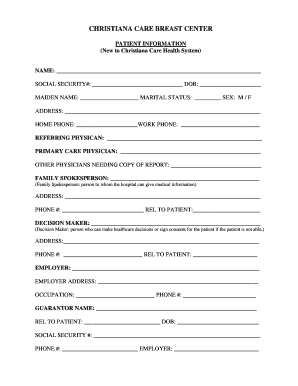
Get New Patient Information Form Mental Health
How it works
-

Open form follow the instructions
-

Easily sign the form with your finger
-

Send filled & signed form or save
How to fill out the New Patient Information Form Mental Health online
Completing the New Patient Information Form is an essential step in initiating your mental health care. This guide will help you navigate the form online, ensuring that you provide all required information clearly and accurately.
Follow the steps to accurately fill out the New Patient Information Form
- Click ‘Get Form’ button to obtain the form and open it in your preferred online editor.
- Begin by filling in your name at the top of the form. Ensure that you provide your full legal name as it appears on official documents.
- Next, enter your social security number. This is necessary for identification and insurance purposes. Do not leave this field blank.
- Fill in your date of birth to verify your age. Use the format MM/DD/YYYY for accuracy.
- Provide your maiden name if applicable. If you do not have one, you can leave this section empty.
- Select your marital status by checking the appropriate box. Options typically include single, married, or divorced.
- Indicate your sex by selecting ‘M’ for male or ‘F’ for female. If you prefer not to disclose, you may leave this section blank.
- Enter your current address and phone numbers for home and work. Make sure all contact information is accurate and up to date.
- List your referring physician and primary care physician's names to help your new healthcare provider understand your care history.
- If other physicians need a copy of your report, include their names in the designated space. This can help streamline communication between your care providers.
- Designate a family spokesperson who can receive medical information on your behalf. Fill in their name, contact information, and relationship to you.
- Identify a decision maker who can make healthcare decisions if you are unable to do so. Provide their information and relationship to you.
- Complete the sections pertaining to your employment details including your employer’s name, address, and phone number.
- Fill in the guarantor's name if different from yours. This person will be responsible for financial obligations related to your care.
- Review all entered information for accuracy. Once verified, you can save changes, download, print, or share the form as needed.
To begin, click the ‘Get Form’ button and complete your New Patient Information Form online today.
No, no charge may be imposed for providing, releasing, or delivering your records or copies of your records when requested for the purpose of supporting an application, claim or appeal for any government benefit or program, provided that, where a provider maintains your records in electronic form, the provider must ...