Loading
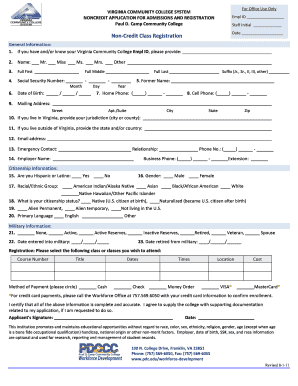
Get Non-credit Class Registration - Paul D. Camp Community College - Pdc
How it works
-

Open form follow the instructions
-

Easily sign the form with your finger
-

Send filled & signed form or save
How to fill out the Non-Credit Class Registration - Paul D. Camp Community College - Pdc online
Filling out the Non-Credit Class Registration form for Paul D. Camp Community College is an essential step in enrolling for classes. This guide provides clear instructions to help users navigate the online registration process efficiently.
Follow the steps to successfully complete your online registration.
- Press the ‘Get Form’ button to access the registration form and open it in your preferred editor.
- Provide your Virginia Community College Employer ID if available. This ID can help streamline your registration process.
- Indicate your name by selecting the appropriate title (Mr., Miss, Ms., Mrs., or Other) and filling in your full first, middle, and last name.
- Enter your Social Security Number in the specified format (XXX-XX-XXXX). This information may be required for identification purposes.
- Fill in your date of birth using the format (MM/DD/YYYY), ensuring accuracy as this information is essential for your enrollment.
- Complete your mailing address, including street, apartment or suite number, city, state, and zip code.
- If residing in Virginia, indicate your jurisdiction (city or county). If living outside Virginia, please specify your state and/or country.
- Provide your email address for communication regarding your registration and coursework.
- Identify an emergency contact by providing their name, relationship to you, and phone number.
- Fill in your employer's name and business phone, including extension if applicable.
- Complete the citizenship information, indicating whether you are Hispanic or Latino, your gender, racial/ethnic group, and citizenship status.
- If applicable, provide military information, including your status and relevant dates.
- Select the class or classes you wish to attend, along with course numbers, titles, and details regarding the method of payment.
- Sign and date the form confirming that all provided information is complete and accurate, agreeing to supply supporting documentation if requested.
- After filling out the form, save your changes, and download, print, or share the completed registration form as needed.
Complete your Non-Credit Class Registration form online today to secure your spot in the desired courses.
When applying, you will be asked to enter a school code to the college you wish to receive financial aid: San Diego City College: 001273. San Diego Mesa College: 001275.
Industry-leading security and compliance
US Legal Forms protects your data by complying with industry-specific security standards.
-
In businnes since 199725+ years providing professional legal documents.
-
Accredited businessGuarantees that a business meets BBB accreditation standards in the US and Canada.
-
Secured by BraintreeValidated Level 1 PCI DSS compliant payment gateway that accepts most major credit and debit card brands from across the globe.