Loading
Get Maryland Form 109b
How it works
-

Open form follow the instructions
-

Easily sign the form with your finger
-

Send filled & signed form or save
How to fill out the Maryland Form 109b online
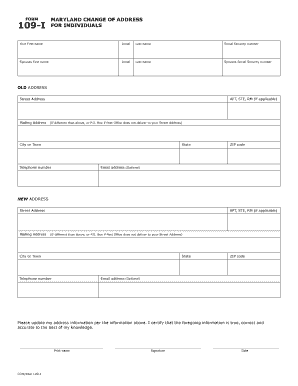
Filling out the Maryland Form 109b online is a straightforward process that allows users to notify the Comptroller of changes to their mailing address. This guide provides step-by-step instructions to ensure you successfully complete the form with ease.
Follow the steps to fill out the Maryland Form 109b online
- Click ‘Get Form’ button to obtain the Maryland Form 109b and open it in the editor.
- Begin with the section labeled 'OLD ADDRESS'. Enter your street address, including any apartment, suite, or room number if applicable. If your mailing address is different from your street address, provide that information as well.
- Next, fill out the 'NEW ADDRESS' section. Enter your new street address along with any necessary apartment, suite, or room number. Include a different mailing address if applicable.
- After entering the address information, provide your telephone number and email address in the designated fields. The email address is optional.
- Review all the information you have entered for accuracy. Ensure that your first name, last name, and any spouse's information are correctly filled in.
- Sign the form and date it in the provided spaces to certify that the information you have given is true and accurate.
- Once you have completed the form, you can save your changes, download a copy, print the form, or share it as needed.
Start filling out the Maryland Form 109b online today!
You can use Form 109-I to notify the Comptroller of Maryland that you have changed your home mailing address. If you have changed both your home and business mailing addresses, please submit Form 109-I along with Form 109-B. Please print using blue or black ink.