Loading
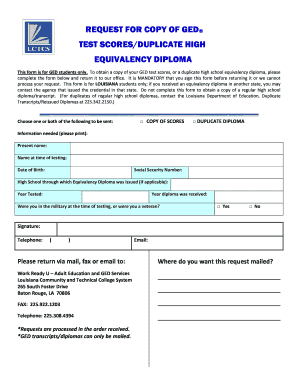
Get Request For Copy Of Ged Form - Louisiana Community And ... - Lctcs
How it works
-

Open form follow the instructions
-

Easily sign the form with your finger
-

Send filled & signed form or save
How to fill out the Request For Copy Of GED Form - Louisiana Community And Technical College System online
Filling out the Request For Copy Of GED Form is an essential step for individuals seeking to obtain their GED test scores or a duplicate high school equivalency diploma. This guide aims to provide clear and supportive instructions for completing the form online, ensuring a smooth process for those involved.
Follow the steps to successfully complete your request.
- Press the ‘Get Form’ button to access the form and open it in the editor.
- Identify the section titled 'Choose one or both of the following to be sent:' and check the box next to either 'COPY OF SCORES' or 'DUPLICATE DIPLOMA', or both, according to your request.
- Navigate to the 'Information needed' section. Here, clearly print your present name as it appears on your identification documents.
- In the field labeled 'Name at time of testing', provide your name as it was recorded when you took the GED test.
- Fill in your date of birth in the designated field to verify your identity.
- Enter your Social Security number in the corresponding field for identification purposes.
- If applicable, indicate the high school through which your equivalency diploma was issued by filling out that section with the correct information.
- Provide the year you took the GED test in the 'Year Tested' section.
- Insert the year you received your diploma in the 'Year diploma was received' field.
- Respond to the military status question by checking the box for 'Yes' or 'No' based on your circumstances.
- Sign the form where indicated to validate your request; your signature is mandatory for processing.
- Include your telephone number and email address to ensure the processing office can contact you if necessary.
- Indicate the address where you want your request mailed in the specified section.
- Review your completed form for accuracy before submitting.
- Once you have confirmed all information is correct, you can save your changes, download a copy for your records, print, or share the form as needed.
Ensure your document is well-prepared and submit your request online for a swift and accurate response.
The free printed diploma can be ordered in your GED® account at GED.com. After logging in, go to My Scores and select Order Duplicates. Select Diploma option and then select the Printed Diploma – Free option. You will then be asked who and what address you want the diploma to be mailed to.
Industry-leading security and compliance
US Legal Forms protects your data by complying with industry-specific security standards.
-
In businnes since 199725+ years providing professional legal documents.
-
Accredited businessGuarantees that a business meets BBB accreditation standards in the US and Canada.
-
Secured by BraintreeValidated Level 1 PCI DSS compliant payment gateway that accepts most major credit and debit card brands from across the globe.