We use cookies to improve security, personalize the user experience, enhance our marketing activities (including cooperating with our marketing partners) and for other business use.
Click "here" to read our Cookie Policy. By clicking "Accept" you agree to the use of cookies. Read less
Read more
Accept
Loading
Form preview
  • US Legal Forms
  • Form Library
  • More Forms
  • More Uncategorized Forms
  • Student Athlete Request For Newborn Screening Hemoglobin Results - Cdph Ca

Get Student Athlete Request For Newborn Screening Hemoglobin Results - Cdph Ca

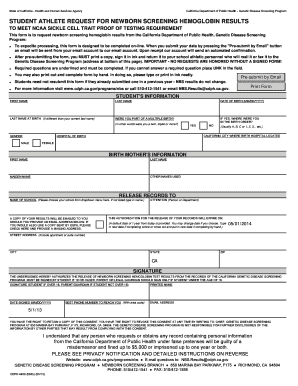
State of California - Health and Human Services Agency California Department of Public Health - Genetic Disease Screening Program STUDENT ATHLETE REQUEST FOR NEWBORN SCREENING HEMOGLOBIN RESULTS TO.

How it works

  1. Open form

    Open form follow the instructions

  2. Easily sign form

    Easily sign the form with your finger

  3. Share form

    Send filled & signed form or save

How to fill out the Student Athlete Request For Newborn Screening Hemoglobin Results - Cdph Ca online

This guide provides clear instructions on how to effectively complete the Student Athlete Request For Newborn Screening Hemoglobin Results form online. By following these steps, users can ensure their requests are processed efficiently and accurately.

Follow the steps to complete your request form online.

  1. Press the ‘Get Form’ button to access the Student Athlete Request For Newborn Screening Hemoglobin Results form. This will open the document in your preferred editing tool.
  2. Fill in the student’s information, including their date of birth, first name, last name, and last name at birth (if applicable). Make sure to answer all required fields, marked by an underline. If you do not know the answer to a required question, enter 'UNK'.
  3. Indicate whether the student was part of a multiple birth (e.g., twin or triplet). If so, specify their birth order using letters or numbers (A, B, C, or 1, 2, 3, etc.). Also provide the California city where the hospital is located and the hospital's name.
  4. Complete the birth mother's information by providing her first name, last name, maiden name, and any other names she may have used. Accurate information is crucial for locating test results.
  5. In the 'Release records to' section, select the school to which records should be sent from the dropdown menu. If the school is not listed, enter the school's name manually. Include the attention line for the person or department that should receive the results.
  6. Provide your email address if you would like a copy of the results emailed to you. If a physical copy is desired as well, check the appropriate box and provide a mailing address.
  7. Specify the expiration date for the authorization to release records. It is set to default as one year from the current date. If needed, change this date accordingly.
  8. Sign the form. The student must sign if they are 18 or older; otherwise, a parent or legal guardian must sign. Print the completed form and sign it in ink, as electronic signatures are not accepted.
  9. Once completed, return the signed form to the school athletic personnel, who will either mail or fax it to the Genetic Disease Screening Program at the specified address.
  10. After submitting the form, ensure to download and save a copy for your records. You may also choose to print the form for a hard copy.

Ensure your request is processed by completing your documents online today.

Get form

Experience a faster way to fill out and sign forms on the web. Access the most extensive library of templates available.
Get form

Related content

Sickle Cell Trait Results - California Department...
Learn more
Preventive Health and Safety in the Child Care...
and ask if she has ever had an HIV test and, if so, would she be willing to share the...
Learn more

Related links form

Form Scc743 Nba Draft Application Form Boston Mutual Wellness Claim Forms CTI - Wpg Ref Form Mar 29 2016.doc

Questions & Answers

Get answers to your most pressing questions about US Legal Forms API.

Contact support

The California Newborn Screening (NBS) Program is a public health program that screens all babies for many serious but treatable genetic disorders. All babies born in California are required to get screened soon after birth.

Under the NHSP, all hospitals with licensed perinatal services are required to provide inpatient hearing screening for all newborns, with the parent's permission, prior to hospital discharge. All infants receiving care in an ICNN/NICU must receive inpatient infant hearing screening services prior to discharge.

The NBS Program takes a blood sample from a newborn's heel from 12 to 48 hours after birth to check for genetic disorders. At the same time, the newborn receives a hearing and congenital heart disease screening.

To ensure the health of all newborns, it's California state law that all babies born in the state have the Newborn Screening Test completed. The test can only be refused if it conflicts with your religious beliefs.

You can contact the child's primary care physician and ask them to FAX a request to the Public Health Laboratory, Attention: LIMS, at 803-896-3862. The request must be faxed on the physician's office letterhead and contain all of the following: Full name of the child at birth.

The conditions on the newborn screening panel can cause permanent and severe health problems or lead to death if not detected early. If you refuse newborn screening, you must indicate your refusal in writing. Staff from the birth facility will send a copy of the refusal form to the Newborn Screening program.

There are four possible results in newborn blood spot screening: Within Normal Limits/Negative, Trait, Borderline, and Positive/Abnormal. A Within Normal Limits or Negative result means that the screen was normal for the disorder and no additional follow-up is required.

Get This Form Now!

Use professional pre-built templates to fill in and sign documents online faster. Get access to thousands of forms.
Get form
If you believe that this page should be taken down, please follow our DMCA take down processhere.

Industry-leading security and compliance

US Legal Forms protects your data by complying with industry-specific security standards.
  • In businnes since 1997
    25+ years providing professional legal documents.
  • Accredited business
    Guarantees that a business meets BBB accreditation standards in the US and Canada.
  • Secured by Braintree
    Validated Level 1 PCI DSS compliant payment gateway that accepts most major credit and debit card brands from across the globe.
Get Student Athlete Request For Newborn Screening Hemoglobin Results - Cdph Ca
Get form
Form Packages
Adoption
Bankruptcy
Contractors
Divorce
Home Sales
Employment
Identity Theft
Incorporation
Landlord Tenant
Living Trust
Name Change
Personal Planning
Small Business
Wills & Estates
Packages A-Z
Form Categories
Affidavits
Bankruptcy
Bill of Sale
Corporate - LLC
Divorce
Employment
Identity Theft
Internet Technology
Landlord Tenant
Living Wills
Name Change
Power of Attorney
Real Estate
Small Estates
Wills
All Forms
Forms A-Z
Form Library
Customer Service
Terms of Service
Privacy Notice
Legal Hub
Content Takedown Policy
Bug Bounty Program
About Us
Help Portal
Legal Resources
Blog
Affiliates
Contact Us
Delete My Account
Site Map
Industries
Forms in Spanish
Localized Forms
State-specific Forms
Forms Kit
Legal Guides
Real Estate Handbook
All Guides
Prepared for You
Notarize
Incorporation services
Our Customers
For Consumers
For Small Business
For Attorneys
Our Sites
US Legal Forms
USLegal
FormsPass
pdfFiller
signNow
airSlate WorkFlow
DocHub
Instapage
Social Media
Call us now toll free:
+1 833 426 79 33
As seen in:
  • USA Today logo picture
  • CBC News logo picture
  • LA Times logo picture
  • The Washington Post logo picture
  • AP logo picture
  • Forbes logo picture
© Copyright 1997-2025
airSlate Legal Forms, Inc.
3720 Flowood Dr, Flowood, Mississippi 39232
Form Packages
Adoption
Bankruptcy
Contractors
Divorce
Home Sales
Employment
Identity Theft
Incorporation
Landlord Tenant
Living Trust
Name Change
Personal Planning
Small Business
Wills & Estates
Packages A-Z
Form Categories
Affidavits
Bankruptcy
Bill of Sale
Corporate - LLC
Divorce
Employment
Identity Theft
Internet Technology
Landlord Tenant
Living Wills
Name Change
Power of Attorney
Real Estate
Small Estates
Wills
All Forms
Forms A-Z
Form Library
Customer Service
Terms of Service
Privacy Notice
Legal Hub
Content Takedown Policy
Bug Bounty Program
About Us
Help Portal
Legal Resources
Blog
Affiliates
Contact Us
Delete My Account
Site Map
Industries
Forms in Spanish
Localized Forms
State-specific Forms
Forms Kit
Legal Guides
Real Estate Handbook
All Guides
Prepared for You
Notarize
Incorporation services
Our Customers
For Consumers
For Small Business
For Attorneys
Our Sites
US Legal Forms
USLegal
FormsPass
pdfFiller
signNow
airSlate WorkFlow
DocHub
Instapage
Social Media
Call us now toll free:
+1 833 426 79 33
As seen in:
  • USA Today logo picture
  • CBC News logo picture
  • LA Times logo picture
  • The Washington Post logo picture
  • AP logo picture
  • Forbes logo picture
© Copyright 1997-2025
airSlate Legal Forms, Inc.
3720 Flowood Dr, Flowood, Mississippi 39232