Loading
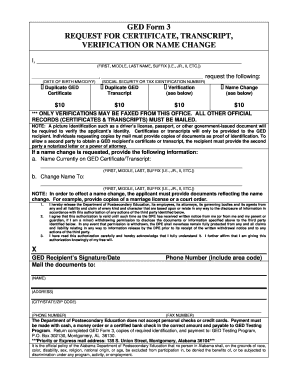
Get Ged Form 3 Request For Certificate, Transcript ... - Wallace
How it works
-

Open form follow the instructions
-

Easily sign the form with your finger
-

Send filled & signed form or save
How to fill out the GED Form 3 REQUEST FOR CERTIFICATE, TRANSCRIPT ... - Wallace online
Filling out the GED Form 3 is an essential process for requesting duplicate certificates, transcripts, verification, or name changes. This guide will help you navigate the form's components step by step, ensuring you provide all necessary information correctly.
Follow the steps to successfully complete your request.
- Press the ‘Get Form’ button to access the form and open it in the editor.
- Fill in your full name in the designated fields, including your first, middle, last name, and any suffix (e.g., Jr., II). Make sure to provide accurate spellings as this will appear on your documents.
- Enter your date of birth in the format MM/DD/YY. This information is crucial for verifying your identity.
- Provide your social security number or tax identification number in the specified field. This information is used for tracking and verification purposes.
- Select the type of request you are making: duplicate GED certificate, duplicate GED transcript, verification, or name change. Each option has a fee of $10, so ensure you understand what you are applying for.
- If requesting a name change, fill in both the name currently on your GED certificate/transcript and the new name to which you wish to change it. Additional documentation such as a marriage license or court order will be required.
- Sign and date the authorization section, acknowledging that you understand the release of information and that this authorization remains valid until you notify the Department of Postsecondary Education in writing.
- Include your mailing information, including your name, address, city, state, zip code, phone number, and fax number, if applicable. This is how the documents will reach you.
- Prepare your payment method. Note that personal checks or credit cards are not accepted; payment should be made via cash, money order, or certified bank check, made payable to the GED Testing Program.
- Finally, review your completed form for accuracy, save your changes, and then download or print it. Follow the instructions to send your application to the GED Testing Program's address provided in the form.
Start your application process online now to obtain your GED documents!
Eco-friendly future begins at home “Waste isn't waste until we waste it.” — Will. ... Don't be a punk! ... Think outside the trash… ... Time is the only thing we can't recycle. Reuse the past, Recycle the present, Save the future. Don't throw cash in the trash, recycle it all – it's your call!