Get Saratoga County Special Needs Registry Form
How it works
-

Open form follow the instructions
-

Easily sign the form with your finger
-

Send filled & signed form or save
How to fill out the Saratoga County Special Needs Registry Form online
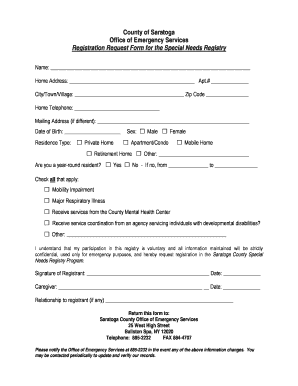
The Saratoga County Special Needs Registry Form is a valuable resource designed to assist individuals with special needs during emergencies. This guide provides a clear, step-by-step process for completing the form online, ensuring all information is accurately submitted and confidential.
Follow the steps to complete the Saratoga County Special Needs Registry Form online.
- Press the ‘Get Form’ button to access the Saratoga County Special Needs Registry Form and open it in your preferred editor.
- Begin by entering your full name in the designated field.
- Fill in your home address, including the apartment number if applicable, city or town, and zip code.
- Provide your home telephone number in the appropriate area.
- If your mailing address is different from your home address, please enter it in the space provided.
- Indicate your gender by selecting the appropriate checkbox.
- Choose your residence type from the options available, ensuring you select the one that most accurately represents your living situation.
- Answer if you are a year-round resident, and if not, specify the months of your absence.
- Enter your date of birth in the specified date field.
- Select all applicable checkboxes to indicate any relevant medical conditions or services.
- Read the statement regarding the voluntary nature of your participation, and confirm your understanding.
- Sign and date the form in the designated areas, and if applicable, include your caregiver’s details and relationship to you.
- Once all fields are complete, save your changes, and you can choose to download, print, or share the form as needed.
Complete the Saratoga County Special Needs Registry Form online today to ensure your important information is accessible during emergencies.
How to create an invoice: A step-by-step guide Brand your invoice. ... Add a professional header. ... Include invoice information. ... Include the dates. ... Description of goods/services delivered. ... Include tax details and highlight the total money owed. ... Include payment terms. ... Add explanatory notes with terms and conditions.
Industry-leading security and compliance
-
In businnes since 199725+ years providing professional legal documents.
-
Accredited businessGuarantees that a business meets BBB accreditation standards in the US and Canada.
-
Secured by BraintreeValidated Level 1 PCI DSS compliant payment gateway that accepts most major credit and debit card brands from across the globe.