Loading
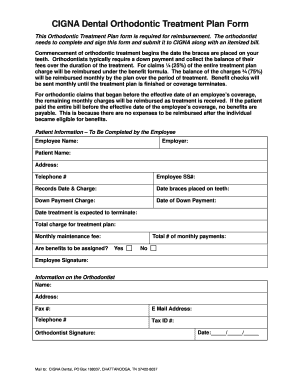
Get Orthodontics Claim Form - Pinellas County - Pinellascounty
How it works
-

Open form follow the instructions
-

Easily sign the form with your finger
-

Send filled & signed form or save
How to fill out the Orthodontics Claim Form - Pinellas County - Pinellascounty online
Filling out the Orthodontics Claim Form is an essential step for individuals seeking reimbursement for orthodontic treatment expenses. This guide provides a clear, step-by-step approach to successfully complete the form online, ensuring that you provide all necessary information accurately.
Follow the steps to complete your orthodontics claim form effectively.
- Press the ‘Get Form’ button to access the Orthodontics Claim Form. This will allow you to open the form in your chosen online editor.
- Begin by filling out the patient information. Enter the employee's name, employer details, and the patient's name. Ensure that the address and telephone number are accurate to avoid any delays in processing.
- Provide the employee's Social Security number (SS#) and the records date along with the associated charge. This information is crucial for identification and reimbursement processes.
- Indicate the date when the braces were placed on the patient's teeth. This marks the official start of the orthodontic treatment period.
- Enter the down payment charge and the date this payment was made. This information helps in calculating the rebates and managing payment structures.
- Fill in the expected date of treatment termination. This will be critical for processing ongoing payments throughout the treatment duration.
- List the total charge for the treatment plan and the monthly maintenance fee. Make sure this aligns with the orthodontist's provided information.
- Indicate whether the benefits are to be assigned by responding 'Yes' or 'No' to the question about benefit assignment.
- Specify the total number of monthly payments associated with the treatment. This will aid in ensuring timely reimbursements.
- The employee must sign the form to confirm all provided information is true and accurate.
- Complete the information for the orthodontist section, including their name, address, fax number, email address, telephone number, and Tax ID number.
- The orthodontist should sign the form to validate the information provided. Ensure that the date is also filled out correctly.
- Once completed, save the changes to your form. You can then choose to download, print, or share the document as necessary.
Begin your orthodontics claim process online today!
Google Voice: The best free way to get a burner number Google Voice is most people's first choice for creating a burner number because it's quick and free. You can get a virtual number from the website or the mobile app. This number can call and text anyone in the U.S. without charges, although you can't customize it.