Loading
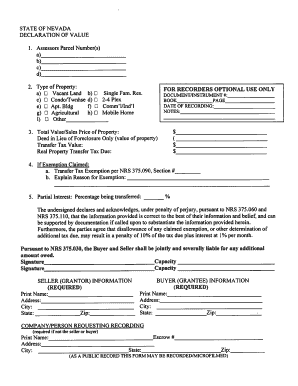
Get A) B) $ $ State: Zip: State: Zip: - Elko County
How it works
-

Open form follow the instructions
-

Easily sign the form with your finger
-

Send filled & signed form or save
How to fill out the A) B) $ $ State: Zip: State: Zip: - Elko County online
This guide provides clear, step-by-step instructions on how to properly fill out the A) B) $ $ State: Zip: State: Zip: - Elko County online form. Whether you are a first-time user or have experience in document management, this guide will assist you in completing the form correctly.
Follow the steps to complete your form accurately
- Click the ‘Get Form’ button to access the online version of the form. This will allow you to open the form in your preferred editor.
- Start by entering the assessors parcel number(s) in the designated field. This information helps identify the property in question.
- Select the type of property by marking the appropriate checkbox. Options include vacant land, single-family residential, condo/townhouse, 2-4 plex, apartment building, agricultural, commercial/industrial, mobile home, or other. Ensure to choose the correct type to avoid processing delays.
- Enter the total value or sales price of the property in the corresponding field. This is important for determining transfer tax obligations.
- Complete the transfer tax value section. Calculate the real property transfer tax due based on the total value of the property.
- If claiming an exemption, fill in the relevant sections. Indicate the transfer tax exemption per NRS 375.090 and provide a brief explanation for the exemption.
- Enter the percentage of partial interest being transferred, if applicable. Providing this information is crucial for proper record-keeping.
- Ensure that all signatories—seller (grantor) and buyer (grantee)—print their names, addresses, cities, states, and ZIP codes clearly in the required section.
- If applicable, provide information for the company or person requesting the recording, including their name, address, city, state, and ZIP code.
- After completing the form, review all entries for accuracy. Once you are satisfied, you can save changes, download the form, print, or share it as needed.
Begin your form-filling process online to ensure timely submission and accurate records.
If you have an address or partial address, you can find the zip code through USPS Zip Code Lookup, a tool on the U.S. postal service's website. You can also search by city or state, or find all cities that are part of a particular zip code.