Loading
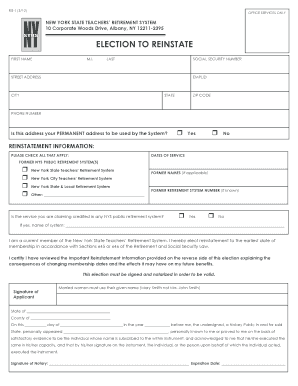
Get Nys Retirement Tier Reinstatement Form
How it works
-

Open form follow the instructions
-

Easily sign the form with your finger
-

Send filled & signed form or save
How to fill out the Nys Retirement Tier Reinstatement Form online
Filling out the Nys Retirement Tier Reinstatement Form can be a straightforward process if you follow the proper steps. This guide will walk you through each section of the form to ensure you complete it accurately and efficiently.
Follow the steps to effectively complete the Nys Retirement Tier Reinstatement Form online.
- Press the 'Get Form' button to access the Nys Retirement Tier Reinstatement Form and open it in your chosen online editor.
- Begin by entering your personal information in the designated fields such as first name, middle initial, last name, social security number, street address, employee ID number (EMPLID), city, state, zip code, and phone number.
- Indicate whether the address provided is your permanent address by checking the appropriate box for 'Yes' or 'No.'
- In the reinstatement information section, check all applicable former New York State public retirement systems you were a part of, entering the specific dates of service where indicated.
- If you have previously used another name, please share your former names in the space provided.
- If known, enter your former retirement system number. Confirm if the service you are claiming is credited in any NYS public retirement system by selecting 'Yes' or 'No' and providing the name of the system if applicable.
- Acknowledge that you are currently a member of the New York State Teachers’ Retirement System and elect to reinstate to the earliest date of membership per the retirement law section stated.
- Review the important reinstatement information provided on the reverse side of the form to understand the implications of your reinstatement decision.
- Sign the form to validate your election. If applicable, ensure to use your given name as directed. After signing, a notary must witness your signature.
- Complete the notary information section, including the state and county of notarization. Ensure the notary's signature and expiration date are included.
- Once all fields are filled out, save your progress, download the completed form for your records, print it if necessary, and prepare to submit or share the form as required.
Start completing your Nys Retirement Tier Reinstatement Form online today!
You may choose to: Terminate your membership and withdraw your accumulated contributions plus interest; or. Leave your contributions in your account and qualify for a retirement benefit when you are age 55.
Industry-leading security and compliance
US Legal Forms protects your data by complying with industry-specific security standards.
-
In businnes since 199725+ years providing professional legal documents.
-
Accredited businessGuarantees that a business meets BBB accreditation standards in the US and Canada.
-
Secured by BraintreeValidated Level 1 PCI DSS compliant payment gateway that accepts most major credit and debit card brands from across the globe.