Loading
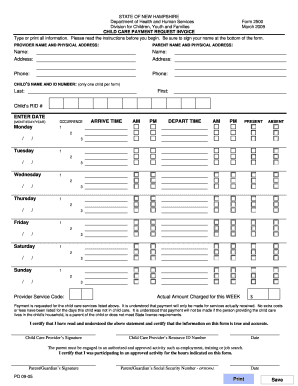
Get Child Care Provider Invoice Form
How it works
-

Open form follow the instructions
-

Easily sign the form with your finger
-

Send filled & signed form or save
How to fill out the Child Care Provider Invoice Form online
This guide provides clear and straightforward instructions on how to fill out the Child Care Provider Invoice Form online. Whether you are a child care provider or a parent, this guide will help you navigate the form with ease.
Follow the steps to complete the Child Care Provider Invoice Form online.
- Click ‘Get Form’ button to obtain the form and open it in your editor.
- Fill in the provider name and physical address. Include the full name and complete address of the child care provider so that payments can be issued correctly.
- Enter the parent name and physical address. Be sure to provide the parent's full name and address without including a P.O. box.
- Input the child's name and ID number. Write the last name and first name of the child being billed and the child's recipient identification number as shown on the Notice of Decision.
- Enter the date for each day the child was scheduled to attend. Format this as month/day/year, starting the week on Monday.
- For each occurrence, indicate the arrival and departure times of the child. You can record up to three occurrences per day.
- Specify whether the child was present or absent using 'P' for present and 'A' for absent. If absent, indicate the scheduled times accordingly.
- Select the appropriate provider service code from the provided options that best describes your type of child care service.
- In the actual amount charged field, enter the total amount that the provider is charging for the week's care without regard to the reimbursement amount.
- Ensure that both the child care provider and the parent/guardian sign the invoice. Include any optional information required.
- Once all information is completed, you can save changes, download, print, or share the form as needed.
Complete your Child Care Provider Invoice Form online today!
How to create an invoice: step-by-step Make your invoice look professional. The first step is to put your invoice together. ... Clearly mark your invoice. ... Add company name and information. ... Write a description of the goods or services you're charging for. ... Don't forget the dates. ... Add up the money owed. ... Mention payment terms.