Loading
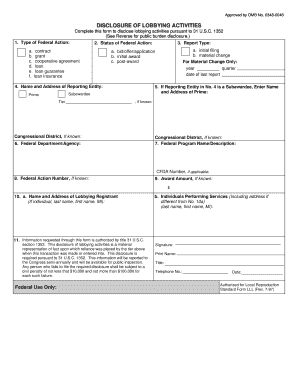
Get Form Sf-lll, Disclosure Of Lobbying Activities - Rurdev Usda
How it works
-

Open form follow the instructions
-

Easily sign the form with your finger
-

Send filled & signed form or save
How to fill out the Form SF-LLL, Disclosure Of Lobbying Activities - Rurdev Usda online
Filling out the Form SF-LLL, Disclosure Of Lobbying Activities, is a crucial task for entities engaging in lobbying activities for federal actions. This guide will provide you with a clear and straightforward approach to completing the form online, ensuring compliance and accuracy.
Follow the steps to complete the form effectively.
- Click ‘Get Form’ button to obtain the form and open it in your editor.
- Enter the type of federal action in the first section. This could include contracts, grants, or loans.
- In the second section, note the status of the federal action. Select whether this is the initial filing or a material change.
- Complete the reporting entity's details, including the name, address, and congressional district if known.
- If applicable, provide the name and address of the prime recipient if your entity is a subawardee.
- Specify the federal department or agency associated with the action, including one organizational level if known.
- Detail the federal program name/description and include the CFDA number if applicable.
- Input the federal action number if known, such as a request for proposal or loan award number.
- Indicate the award amount if known.
- Provide the name and address of the lobbying registrant and, if applicable, individuals performing services including their addresses.
- Certify the accuracy of the information by completing the signature, printed name, title, telephone number, and date.
- Finally, save your changes, and choose to download, print, or share the completed form.
Complete and submit your Form SF-LLL online today to ensure compliance with federal regulations.
To initiate the cancellation process, simply select the "Start Cancellation" button provided below. You'll notice our chatbot appear in the lower right-hand corner of your screen. The chatbot will guide you through the next steps to process your cancellation request.
Industry-leading security and compliance
US Legal Forms protects your data by complying with industry-specific security standards.
-
In businnes since 199725+ years providing professional legal documents.
-
Accredited businessGuarantees that a business meets BBB accreditation standards in the US and Canada.
-
Secured by BraintreeValidated Level 1 PCI DSS compliant payment gateway that accepts most major credit and debit card brands from across the globe.