Loading
Get Pcn - U.s. Army
How it works
-

Open form follow the instructions
-

Easily sign the form with your finger
-

Send filled & signed form or save
How to fill out the PCN - U.S. Army online
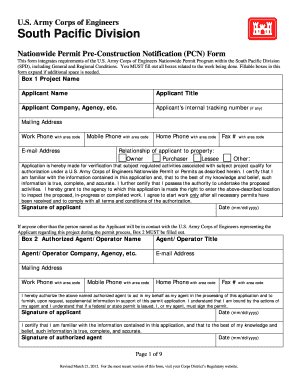
Filling out the Nationwide Permit Pre-Construction Notification (PCN) form for the U.S. Army Corps of Engineers can seem daunting. This guide provides clear, step-by-step instructions to help users navigate the process easily, ensuring compliance with all necessary requirements.
Follow the steps to complete your PCN form accurately.
- Press the ‘Get Form’ button to access the PCN form and open it in your preferred editor.
- Begin with Box 1. Fill in the project name and details related to the applicant, including their name, title, company, and contact information. Ensure all boxes related to the project's work are completed.
- If an authorized agent or operator will represent the applicant, complete Box 2 with their information, including name, title, and contact details.
- Proceed to Box 3 to provide the name and details of the property owner, if different from the applicant.
- In Box 4, list any contractors involved in the project, including their contact information.
- Fill out Box 5 with the specifics about the project location and other relevant geographic details, including latitude and longitude, along with the nature and purpose of the project.
- In Box 6, acknowledge the reasons for discharging material into U.S. waters, detailing the type of material and its impact on the environment.
- Address additional questions and requirements in subsequent boxes, including measures to minimize impact, documentation of endangered species, and cultural resource checks.
- After completing all relevant sections, review your entries for accuracy. Users can then save the form, download it, print it, or share it as required.
Complete your PCN form online to ensure a smooth application process.
You can open the Image Viewer app from the Apps tab, under Image Processing and Computer Vision. To bring image data into Image Viewer from a file name, select Open from the File menu. To bring image data into Image Viewer from the workspace, select Import from Workspace from the File menu.