Loading
Get Da Pam 25 33 Pdf
How it works
-

Open form follow the instructions
-

Easily sign the form with your finger
-

Send filled & signed form or save
How to fill out the Da Pam 25 33 Pdf online
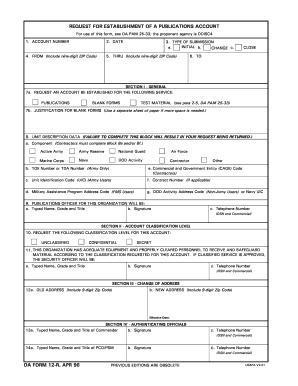
Filling out the Da Pam 25 33 Pdf is a crucial step for establishing a publications account. This guide will walk you through each section of the form, ensuring a smooth online submission process.
Follow the steps to complete your form accurately.
- Click ‘Get Form’ button to access the Da Pam 25 33 Pdf and open it in your editing tool.
- Fill in the 'Account Number' field with the appropriate account identifier that you are applying for.
- Enter the 'Date' in the designated field, ensuring you use the correct format.
- Complete the 'From' section by providing your full address, including the nine-digit ZIP code.
- Indicate the 'Type of Submission' by selecting 'Initial', 'Change', or 'Close' as appropriate.
- In 'Section I - General', request an account for the applicable service by checking 'Publications', 'Blank Forms', or 'Test Material'.
- If you are requesting blank forms, provide justification in the space provided or on a separate sheet if needed.
- Fill in the 'Unit Description Data'. Ensure all components, including the appropriate codes, are accurately entered.
- Provide the name, title, and contact details of the 'Publications Officer' for your organization.
- Select the 'Classification Level' for the account from 'Unclassified', 'Confidential', or 'Secret'.
- Confirm that your organization has appropriate equipment and personnel for the classification level. Include the details of the security officer.
- If you are changing an address, enter your old and new addresses in the corresponding fields, along with the effective date.
- Complete the 'Authenticating Officials' section by providing the required details and signatures of the relevant commanders.
- Once all sections are filled, review your entries for accuracy before finalizing.
- Save your changes, and then choose whether to download, print, or share the completed form.
Ensure your forms are completed accurately and submit them online for timely processing.
For a complete listing of Army publications and forms, please visit https://armypubs.army.mil/.