Loading
Get Blank Mar
How it works
-

Open form follow the instructions
-

Easily sign the form with your finger
-

Send filled & signed form or save
How to fill out the Blank Mar online
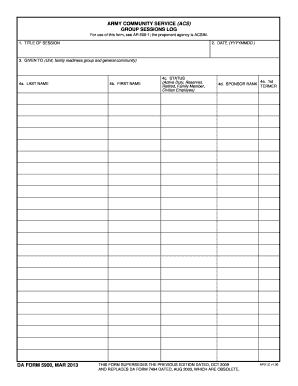
Filling out the Blank Mar form is essential for documenting group sessions in the Army Community Service framework. This guide provides clear and supportive instructions on how to complete each section of the form efficiently.
Follow the steps to successfully complete the Blank Mar form online.
- Press the ‘Get Form’ button to access the Blank Mar form and open it in your preferred editing interface.
- In the 'Title of Session' field, enter the name of the session you are documenting. This should clearly reflect the purpose of the gathering.
- Next, input the date of the session in the format YYYYMMDD. Ensure that the date is accurate to maintain clear records.
- Fill out the 'Given To' section. Specify the unit, family readiness group, or general community that participated in the session.
- In the fields labeled 'Last Name' and 'First Name', provide the names of the primary contact or participant. This ensures proper identification.
- Select the status of the individual from the options: Active Duty, Reservist, Retired, Family Member, or Civilian Employee. This categorization is essential for record-keeping.
- Indicate the sponsor's rank in the 'Sponsor Rank' field to further categorize the participant accordingly.
- If applicable, indicate if the individual is a 1st Termer in the designated field.
- After completing all required fields, ensure that all information is accurate and consistent. You can then choose to save changes, download, print, or share the completed form as needed.
Complete your documentation efficiently by filling out the Blank Mar form online today.
Binary Authorization aims to reduce the risk of deploying defective, vulnerable, or unauthorized software in this type of environment. Using this service, you can prevent images from being deployed unless it satisfies a policy you define.