We use cookies to improve security, personalize the user experience, enhance our marketing activities (including cooperating with our marketing partners) and for other business use.
Click "here" to read our Cookie Policy. By clicking "Accept" you agree to the use of cookies. Read less
Read more
Accept
Loading
Form preview
  • US Legal Forms
  • Form Library
  • More Forms
  • More Uncategorized Forms
  • New Hire Personal Information Form - Merrill Lynch

Get New Hire Personal Information Form - Merrill Lynch

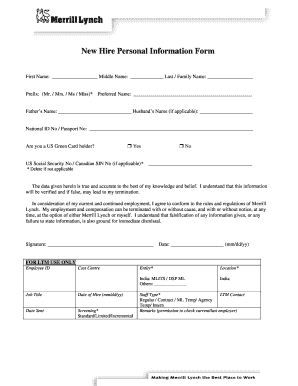
New Hire Personal Information Form First Name: Middle Name: Last / Family Name: Prefix: (Mr. / Mrs. / Ms / Miss)* Preferred Name: Father s Name: Husband s Name (if applicable): National ID No / Passport.

How it works

  1. Open form

    Open form follow the instructions

  2. Easily sign form

    Easily sign the form with your finger

  3. Share form

    Send filled & signed form or save

How to fill out the New Hire Personal Information Form - Merrill Lynch online

Completing the New Hire Personal Information Form is an essential step in the onboarding process for new employees at Merrill Lynch. This guide provides clear, step-by-step instructions to help you fill out the form accurately and efficiently, ensuring that all required information is properly submitted.

Follow the steps to complete your New Hire Personal Information Form effectively.

  1. Click ‘Get Form’ button to obtain the form and open it in your preferred document editor.
  2. Enter your first name, middle name (if applicable), and last name in the respective fields.
  3. Select a prefix (Mr., Mrs., Ms., Miss) from the provided options.
  4. Input your preferred name, which can be different from your legal name, if you have one.
  5. Fill in your father's name and, if applicable, your spouse's name in the designated sections.
  6. Provide your National ID number or Passport number as required.
  7. Indicate if you are a U.S. Green Card holder by selecting 'Yes' or 'No'.
  8. Enter your U.S. Social Security number or Canadian SIN number, deleting the field if not applicable.
  9. Read and acknowledge the statement regarding the accuracy of the information provided, then sign and date the form.
  10. Complete the Employment History Information by detailing your latest experiences, ensuring to include all roles from the past five years.
  11. Fill out the Education Information section by providing details about your college and university education.
  12. Document your home address for the past five years accurately in the specified fields.
  13. Complete the Citizenship Information and Address Information sections as required.
  14. Fill in the Telephone Information and Marital Status sections to provide your contact details and relationship status.
  15. Detail any spouse and children information, if applicable, followed by emergency contact information.
  16. Provide your employment information, citizenship-related details, language proficiency, and any additional relevant information.
  17. Sign the Letter of Authorization and fill in your identification information, if required.
  18. Once all sections are completed, save the changes, and choose to download, print, or share the form as needed.

Take the first step in your new career by completing your New Hire Personal Information Form online today.

Get form

Experience a faster way to fill out and sign forms on the web. Access the most extensive library of templates available.
Get form

Related content

Policy 4.02 Employee Brokerage Accounts - SEC.gov
New employees must report covered brokerage accounts by completing and submitting the...
Learn more
Merrill Lynch & Co. 10-K 12/26/2008 Section 1:...
Dec 26, 2008 — Trust Preferred Securities of Merrill Lynch Capital Trust I (and the...
Learn more
Blackhawk Network Holdings - Wikipedia
Number of employees. 3,190. Website, BlackhawkNetwork.com. Blackhawk Network Holdings Inc...
Learn more

Related links form

UCSB Career Services Resume Brainstorming Worksheet Milbin Printing Form 199C 2002 Form 26 Case Investigation Form

Questions & Answers

Get answers to your most pressing questions about US Legal Forms API.

Contact support

Bank of America acquired Merrill Lynch in late 2008 during the financial crisis. The $50 billion deal came as Merrill Lynch was within days of collapse, effectively rescuing it from bankruptcy.

Merrill Lynch may tout that its roughly 6,500 client associates are essential to the business, but many are leaving the wirehouse because of overwhelming workloads, frustrating working conditions and poor pay, ing to news reports.

Note: For marriage, divorce or court order name changes you must sign in both signature boxes in part E (current name and former name). You may also call Merrill at 877.653. 4732 with any questions. Representatives are available to assist you 24 hours a day, 7 days a week.

What Is Merrill Lynch & Co.? Merrill Lynch & Co. is the former name of a prominent Wall Street investment firm. Since its acquisition by Bank of America (BAC) in 2009, it has become known simply as “Merrill” and operates as a wealth management division of Bank of America.

What you'll need Social Security number and date of birth. A valid mailing and email addresses. Employment information (including company name, address, and start date) General financial information (such as annual income and household net worth)

On September 5, 2008 Goldman Sachs downgraded Merrill Lynch's stock to "conviction sell" and warned of further losses at the company. Bloomberg reported in September 2008 that Merrill Lynch had lost $51.8 billion on mortgage-backed securities as part of the subprime mortgage crisis.

Ten years after the financial crisis, Bank of America is phasing out the Merrill Lynch brand for some businesses. Bank of America (BAC)said Monday that it will no longer use the Merrill Lynch name for its investment banking and trading divisions. Instead, these businesses will form a unit called BofA Securities.

The move is part of CEO Brian Moynihan's “one-company” strategy to more closely align the bank's various businesses and branding. The company will also no longer use the Merrill Lynch brand for its investment banking, global markets and capital markets group.

Get This Form Now!

Use professional pre-built templates to fill in and sign documents online faster. Get access to thousands of forms.
Get form
If you believe that this page should be taken down, please follow our DMCA take down processhere.

Industry-leading security and compliance

US Legal Forms protects your data by complying with industry-specific security standards.
  • In businnes since 1997
    25+ years providing professional legal documents.
  • Accredited business
    Guarantees that a business meets BBB accreditation standards in the US and Canada.
  • Secured by Braintree
    Validated Level 1 PCI DSS compliant payment gateway that accepts most major credit and debit card brands from across the globe.
Get New Hire Personal Information Form - Merrill Lynch
Get form
Form Packages
Adoption
Bankruptcy
Contractors
Divorce
Home Sales
Employment
Identity Theft
Incorporation
Landlord Tenant
Living Trust
Name Change
Personal Planning
Small Business
Wills & Estates
Packages A-Z
Form Categories
Affidavits
Bankruptcy
Bill of Sale
Corporate - LLC
Divorce
Employment
Identity Theft
Internet Technology
Landlord Tenant
Living Wills
Name Change
Power of Attorney
Real Estate
Small Estates
Wills
All Forms
Forms A-Z
Form Library
Customer Service
Terms of Service
Privacy Notice
Legal Hub
Content Takedown Policy
Bug Bounty Program
About Us
Help Portal
Legal Resources
Blog
Affiliates
Contact Us
Delete My Account
Site Map
Industries
Forms in Spanish
Localized Forms
State-specific Forms
Forms Kit
Legal Guides
Real Estate Handbook
All Guides
Prepared for You
Notarize
Incorporation services
Our Customers
For Consumers
For Small Business
For Attorneys
Our Sites
US Legal Forms
USLegal
FormsPass
pdfFiller
signNow
airSlate WorkFlow
DocHub
Instapage
Social Media
Call us now toll free:
+1 833 426 79 33
As seen in:
  • USA Today logo picture
  • CBC News logo picture
  • LA Times logo picture
  • The Washington Post logo picture
  • AP logo picture
  • Forbes logo picture
© Copyright 1997-2025
airSlate Legal Forms, Inc.
3720 Flowood Dr, Flowood, Mississippi 39232
Form Packages
Adoption
Bankruptcy
Contractors
Divorce
Home Sales
Employment
Identity Theft
Incorporation
Landlord Tenant
Living Trust
Name Change
Personal Planning
Small Business
Wills & Estates
Packages A-Z
Form Categories
Affidavits
Bankruptcy
Bill of Sale
Corporate - LLC
Divorce
Employment
Identity Theft
Internet Technology
Landlord Tenant
Living Wills
Name Change
Power of Attorney
Real Estate
Small Estates
Wills
All Forms
Forms A-Z
Form Library
Customer Service
Terms of Service
Privacy Notice
Legal Hub
Content Takedown Policy
Bug Bounty Program
About Us
Help Portal
Legal Resources
Blog
Affiliates
Contact Us
Delete My Account
Site Map
Industries
Forms in Spanish
Localized Forms
State-specific Forms
Forms Kit
Legal Guides
Real Estate Handbook
All Guides
Prepared for You
Notarize
Incorporation services
Our Customers
For Consumers
For Small Business
For Attorneys
Our Sites
US Legal Forms
USLegal
FormsPass
pdfFiller
signNow
airSlate WorkFlow
DocHub
Instapage
Social Media
Call us now toll free:
+1 833 426 79 33
As seen in:
  • USA Today logo picture
  • CBC News logo picture
  • LA Times logo picture
  • The Washington Post logo picture
  • AP logo picture
  • Forbes logo picture
© Copyright 1997-2025
airSlate Legal Forms, Inc.
3720 Flowood Dr, Flowood, Mississippi 39232