Loading
Get Hnb Online Banking
How it works
-

Open form follow the instructions
-

Easily sign the form with your finger
-

Send filled & signed form or save
How to fill out the Hnb Online Banking application form online
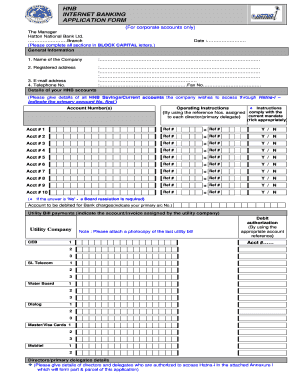
Completing the Hnb Online Banking application form is a straightforward process that enables corporate accounts to access online banking services. This guide will provide step-by-step instructions to help users fill out the form accurately.
Follow the steps to complete your Hnb Online Banking application form.
- Click ‘Get Form’ button to obtain the form and open it in the editor.
- Fill out the date section accurately to indicate the day of your application.
- In the 'Name of the Company' section, clearly write the full legal name of your company in BLOCK CAPITAL letters as specified.
- Provide the registered address of your company. Make sure to include all necessary details such as street address, city, and postal code.
- Enter the contact information including your company's e-mail address and telephone number.
- List all HNB Savings or Current accounts that your company wishes to access through Hatna-i. Start with the primary account number.
- For each account, provide the corresponding reference number and specify whether it is associated with the current mandate by indicating Yes or No.
- Designate an account to be debited for Bank charges by indicating the primary account number.
- Identify the utility companies for which the company will make payments, ensuring to attach a photocopy of the last utility bill.
- Complete the Directors/primary delegates section by providing details of those authorized to access Hatna-i. Use Annexure I for detailed information.
- Read and understand the terms and conditions; by signing, confirm your compliance.
- Once all sections are filled, users can save changes, download, print, or share the completed form.
Complete your Hnb Online Banking application form online today.
To issue a Person-to-Person payment, log in to HNB Online Banking and select "Send Money" under the Person-to-Person Payment options on the Home screen. Follow the prompts to enroll if you haven't done so already or to register a new payee. You may also issue payments to existing contacts through your HNB Mobile app.