Loading
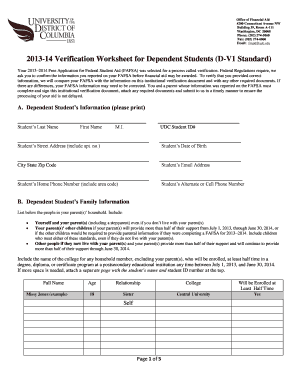
Get Standard Verification (d-v1) - Udc
How it works
-

Open form follow the instructions
-

Easily sign the form with your finger
-

Send filled & signed form or save
How to fill out the Standard Verification (D-V1) - Udc online
Filling out the Standard Verification (D-V1) form is an essential step for dependent students whose Free Application for Federal Student Aid (FAFSA) has been selected for verification. This guide will provide you with clear, step-by-step instructions to help you complete the form accurately and submit it online.
Follow the steps to successfully complete the Standard Verification (D-V1) - Udc online.
- Press the ‘Get Form’ button to access the Standard Verification (D-V1) form and open it in your browser for editing.
- Start by filling in the dependent student's information. Include the last name, first name, middle initial, and UDC student ID number. Also, provide the student's street address, city, state, zip code, date of birth, email address, and both home and cell phone numbers.
- Proceed to the family information section. List yourself and your parent(s), including any stepparents, as well as any siblings or other dependents living with your parents. Indicate their names, ages, relationship to you, and the college they will attend if relevant.
- In the income verification section, check the appropriate box based on whether you filed an income tax return for 2012. If you did not file, complete the Student Non-Filer Form. If you did file, complete the section using the IRS Data Retrieval Tool or provide your IRS tax return transcript, as instructed.
- Next, move to the parent's income verification. Like the previous step, select the appropriate option regarding your parent(s)' tax filing status for 2012 and provide necessary documentation.
- Complete the section regarding SNAP benefits and child support. Indicate if applicable, and provide relevant information as required, including any supporting documentation if necessary.
- Finally, make sure both the student and one parent whose information was provided sign and date the form. Ensure that all required boxes are checked, and all necessary documentation is attached.
- Once completed, save your changes, and download or print the form as needed. You may also share the completed form via email if applicable. Make sure to submit it to the UDC Financial Aid Office either in person or by fax.
Complete your Standard Verification (D-V1) - Udc form online today to ensure your financial aid process is not delayed.
Affidavits can occur any time a formal promise is made, and they are often used as a form of documentation tied to a specific person in the proceedings. They are often used in court to serve as evidence toward a singular side in a dispute, or to affirm a claim that someone is making.
Industry-leading security and compliance
US Legal Forms protects your data by complying with industry-specific security standards.
-
In businnes since 199725+ years providing professional legal documents.
-
Accredited businessGuarantees that a business meets BBB accreditation standards in the US and Canada.
-
Secured by BraintreeValidated Level 1 PCI DSS compliant payment gateway that accepts most major credit and debit card brands from across the globe.