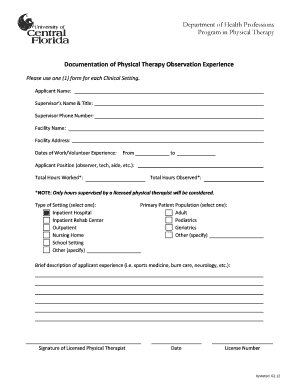
Department of Health Professions Program in Physical Therapy Documentation of Physical Therapy Observation Experience Please use one (1) form for each Clinical Setting. Applicant Name: Supervisor?s.

How it works
  • Open form

    Open form follow the instructions

  • Easily sign form

    Easily sign the form with your finger

  • Share form

    Send filled & signed form or save

How to use or fill out the Documentation Of Observation Hours Form - Www2 Cohpa Ucf online

The Documentation Of Observation Hours Form is a crucial component for individuals seeking to document their physical therapy observation experience. This guide provides detailed steps to fill out the form accurately and efficiently, ensuring that your submission meets the necessary requirements.

Follow the steps to effectively complete the form.

  1. Press the ‘Get Form’ button to retrieve the form and open it in an editable format.
  2. Fill out the 'Applicant Name' field with your full name as it appears in your official documents.
  3. Enter the 'Supervisor’s Name & Title' of the licensed physical therapist overseeing your observation hours.
  4. Provide the 'Supervisor Phone Number' where the supervisor can be reached for verification purposes.
  5. Complete the 'Facility Name' field with the name of the institution where you completed your observation hours.
  6. Include the complete 'Facility Address' to ensure proper documentation.
  7. Enter the 'Dates of Work/Volunteer Experience' in the specified fields, indicating the time period from start to end.
  8. Specify your 'Applicant Position' by selecting from options such as observer, tech, or aide.
  9. Fill in the 'Total Hours Worked' and 'Total Hours Observed' fields with the accurate numbers; note that only hours supervised by a licensed physical therapist will be considered.
  10. Select the 'Type of Setting' from options such as inpatient hospital, outpatient, or school setting.
  11. Identify the 'Primary Patient Population' relevant to your experience, choosing from adult, pediatrics, and other categories.
  12. Provide a 'Brief description of applicant experience' summarizing your relevant background in fields like sports medicine or neurology.
  13. Ensure the form is signed by the licensed physical therapist and include the date and license number.
  14. Once all sections are completed, save changes, download, print, or share the form as necessary.

Complete your Documentation Of Observation Hours Form online today to ensure your submission is timely and accurate.

Get form

Experience a faster way to fill out and sign forms on the web. Access the most extensive library of templates available.

Related content

EOC Survivability - National Fire Academy students...

In the 12 hours leading up ... Defense Support of Civil Authorities During Hurricane...

Learn more
Graduate Student Handbook - UCF College of Health...

also welcome you to check out our website (https://www.cohpa.ucf.edu/csd/) to learn...

Learn more
Questions & Answers

Get answers to your most pressing questions about US Legal Forms API.

Contact support

How do you resize a chart to cells?

Click anywhere in the chart. CONTROL+click or right-click, and then click Format Chart Area. tab. Select Move and size with cells.

Answer. To resize the chart, position the mouse pointer on any of the corner border of the chart. The mouse pointer will change to a double-headed arrow. Now drag the handle in the desired direction to change the size ingly.

1:56 3:47 Resizing The Plot Area In Excel Chart To Prevent Titles And Labels From ... YouTube Start of suggested clip End of suggested clip And you click the format tab here. And then over on the left side of the format tab there's thisMoreAnd you click the format tab here. And then over on the left side of the format tab there's this drop-down box. And this within this drop-down box all the chart elements are listed here.

Remove data series from a chart in Excel Right click the chart and choose Select Data from the right-clicking menu. 2. In the opening Select Data Source dialog box, select the series you want to remove and then click the Remove button in the Legend Entries (Series) box. And finally click OK to save the changes.

To resize a chart, do one of the following: To change the size manually, click the chart, and then drag the sizing handles to the size that you want. To use specific height and width measurements, on the Format tab, in the Size group, enter the size in the Height and Width box.

When you delete a chart, the data you have used as the source of the table remains intact. Click the edge of chart's frame to highlight the chart. On the Home tab, in the Editing group, click Clear > Clear All. Tip: For faster results, you can also press Delete on your keyboard.

1:05 2:05 Make all Excel charts the same size (2 ways) - YouTube YouTube Start of suggested clip End of suggested clip So as I do that everything moves at the same time. So for example it looks like it's all disappearedMoreSo as I do that everything moves at the same time. So for example it looks like it's all disappeared. I can get them to my 12.15. So maybe make all of those seven.

You can delete any chart in your document without affecting any table data. Click the chart to select it, then press Delete on your keyboard.

Get This Form Now!

Use professional pre-built templates to fill in and sign documents online faster. Get access to thousands of forms.

If you believe that this page should be taken down, please follow our DMCA take down process here.

Get Documentation Of Observation Hours Form - Www2 Cohpa Ucf