Loading
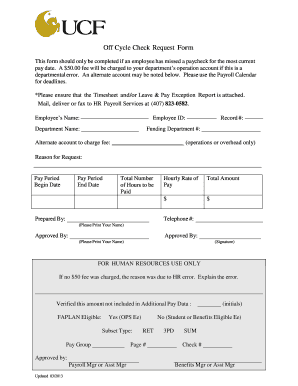
Get Off Cycle Check Request Form - Human Resources - Hr Ucf
How it works
-

Open form follow the instructions
-

Easily sign the form with your finger
-

Send filled & signed form or save
How to fill out the Off Cycle Check Request Form - Human Resources - Hr Ucf online
Properly completing the Off Cycle Check Request Form is essential for addressing missed paychecks promptly and efficiently. This guide provides a straightforward, step-by-step approach to help you navigate and fill out the form online.
Follow the steps to fill out the Off Cycle Check Request Form online effectively.
- Click ‘Get Form’ button to obtain the form and open it in the editor.
- Begin by entering your full name in the 'Employee’s Name' section. This ensures that HR can easily identify whose check request is being processed.
- Next, input your unique Employee ID, which is necessary for tracking payroll information accurately.
- Fill in the 'Department Name' where you work. This associates the request with the correct operational area.
- Enter your 'Record #' to provide additional context related to your employment record.
- In the 'Funding Department #' field, specify the account number associated with your department's funding.
- If you believe a fee will be charged for the off-cycle check due to a departmental error, note the 'Alternate account to charge fee'. This should be either operational or overhead.
- Clearly state the 'Reason for Request'. Provide as much detail as possible to help HR understand the context of your request.
- Input the 'Pay Period Begin Date' and 'Pay Period End Date' to indicate the timeframe for which you are requesting payment.
- Specify the 'Total Number of Hours to be Paid'. Ensure this matches the hours reported in your timesheet.
- Indicate your 'Hourly Rate of Pay'. This information is vital for calculating the total amount requested.
- Finally, calculate and enter the 'Total Amount' you are requesting. This should reflect the product of hours worked and hourly rate.
- Provide your telephone number for any necessary follow-up from HR.
- Print your name in the 'Prepared By' section to indicate who filled out the form.
- The request must be approved by the designated personnel. Provide the name and signature of the 'Approved By' individual.
- Once all sections are filled out, save your changes, and prepare to submit the form. You can download, print, or share the completed form through your chosen method.
Take the next step by completing your Off Cycle Check Request Form online today.
UCF Employee Tuition Waiver UCF offers tuition assistance to eligible employees in the form of tuition waivers, good for up to six (6) credit hours of coursework per semester. Eligible employees include USPS, A&P, Faculty, and Executive Service and courses are restricted to those taken at UCF.