Loading
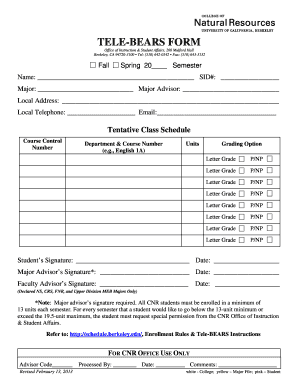
Get Tele-bears Form - Nature Berkeley
How it works
-

Open form follow the instructions
-

Easily sign the form with your finger
-

Send filled & signed form or save
How to fill out the TELE-BEARS FORM - Nature Berkeley online
Filling out the TELE-BEARS FORM - Nature Berkeley is an essential step for students to register for their courses effectively. This guide provides comprehensive, step-by-step instructions to help users complete the form accurately and efficiently.
Follow the steps to complete the TELE-BEARS FORM with ease.
- Click the ‘Get Form’ button to access the TELE-BEARS FORM. This will allow you to open the document in an online editor for seamless completion.
- Indicate the semester you are applying for by selecting either 'Fall' or 'Spring' and entering the year.
- Fill in your personal information: enter your name, student identification number (SID), and major.
- Provide details for your major advisor by entering their name.
- Complete your local address and telephone number, ensuring all information is accurate and up to date.
- In the tentative class schedule section, enter the course control numbers and the corresponding department and course numbers for each class you wish to enroll in. Include the number of units for each course.
- Select your preferred grading option for each course (Letter Grade or Pass/Not Pass) by marking the appropriate choice.
- Once all sections are complete, ensure both you and your major advisor sign and date the form. If applicable, include a signature from your faculty advisor.
- After verifying that all information is correct, you can save your changes, download the completed form, print it, or share it as needed.
Complete your TELE-BEARS FORM online now to ensure a smooth registration process.