Loading
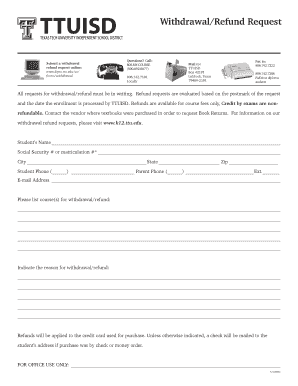
Get Withdrawal/refund Request - Depts Ttu
How it works
-

Open form follow the instructions
-

Easily sign the form with your finger
-

Send filled & signed form or save
How to fill out the Withdrawal/Refund Request - Depts Ttu online
This guide provides a comprehensive overview of how to accurately complete the Withdrawal/Refund Request form for Depts Ttu online. Follow these steps to ensure that your request is submitted correctly and efficiently.
Follow the steps to complete your withdrawal/refund request form.
- Click ‘Get Form’ button to access the Withdrawal/Refund Request form and open it in your preferred document editor.
- Provide your personal information. Fill in your full name, either your Social Security number or matriculation number, and your full address including city, state, and zip code.
- Enter contact information. Input your phone number, and if applicable, your parent or guardian's phone number. Include an email address for further communication regarding your request.
- List the course(s) for which you are requesting a withdrawal or refund. Clearly write the course titles or codes as they appear on your enrollment details.
- Indicate the reason for your withdrawal or refund request. Be specific, providing any necessary details to support your reason clearly.
- Review your completed form for accuracy. Ensure all fields are filled out correctly and clearly.
- Once you are satisfied with your form, save your changes, and prepare to submit it as directed. Options may include downloading a copy, printing it, or sharing it through email or fax.
Complete your Withdrawal/Refund Request form online today to ensure you receive the assistance you need.
Dropping a course or withdrawing from the university will not affect a student's grade point average. However, the drop will be noted as a DG on the transcript for the dropped course, and the withdrawal will be noted as a W for all of the courses the student withdraws from during the semester.
Industry-leading security and compliance
US Legal Forms protects your data by complying with industry-specific security standards.
-
In businnes since 199725+ years providing professional legal documents.
-
Accredited businessGuarantees that a business meets BBB accreditation standards in the US and Canada.
-
Secured by BraintreeValidated Level 1 PCI DSS compliant payment gateway that accepts most major credit and debit card brands from across the globe.