Loading
Get Exception Hiring Authorization Form Multi-incumbent Temporary ... - Web Kennesaw
How it works
-

Open form follow the instructions
-

Easily sign the form with your finger
-

Send filled & signed form or save
How to fill out the Exception Hiring Authorization Form Multi-Incumbent Temporary online
Filling out the Exception Hiring Authorization Form Multi-Incumbent Temporary is a straightforward process, essential for effective staffing and workflow management. This guide will help you navigate the form with ease and ensure all necessary information is accurately captured.
Follow the steps to effectively complete the form online.
- Click ‘Get Form’ button to obtain the form and open it in the editor.
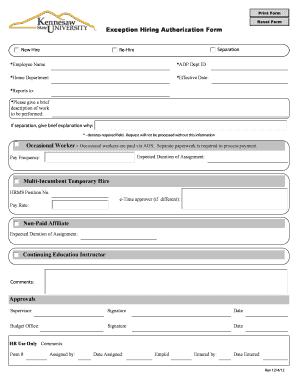
- Start by entering the employee's name in the designated field marked with an asterisk, which indicates that this is a required field.
- Next, input the ADP Department ID. This is also a required field, so ensure that it is accurate to avoid processing delays.
- Fill in the home department of the employee. Confirm that this information reflects the correct department for the position.
- Indicate the effective date for the hiring. This date should align with the planned start date for the new hire.
- Identify the supervisor by entering their name in the 'Reports to' field. This helps to establish the reporting structure for the new hire.
- Provide a brief description of the work to be performed by the new hire. This section helps clarify the role of the employee.
- If applicable, offer a brief explanation regarding the separation of the previous employee. Include the reason if the form is for re-hiring purposes.
- Specify the expected duration of the assignment in the designated field based on the nature of the hire, whether occasional worker, multi-incumbent temporary hire, or continuing education instructor.
- Indicate the pay frequency, ensuring it reflects the department's payroll practices.
- Fill in the HRMS Position Number, if applicable, and provide the name of the e-Time approver, if it differs from the supervisor listed.
- Outline the proposed pay rate for the new hire in the relevant section.
- In the comments section, add any additional information or context that may be relevant to the request.
- The next part of the form focuses on approvals. Input the name and signature of the supervisor along with the date for their approval.
- Similarly, include the budget office's signature and date in the corresponding fields to ensure proper authorization.
- For HR purposes, provide any required comments in the HR Use Only section. Include the assigned position number and document the entry details.
- Once all fields are properly filled out, save your changes. You can also choose to download, print, or share the form as needed for your records.
Complete your documents online today and streamline your hiring process!