Loading
Get Verification Worksheet For Dependent Students - Kean University - Kean
How it works
-

Open form follow the instructions
-

Easily sign the form with your finger
-

Send filled & signed form or save
How to fill out the Verification Worksheet For Dependent Students - Kean University - Kean online
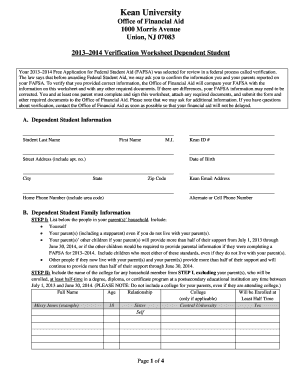
This guide provides step-by-step instructions for completing the Verification Worksheet for Dependent Students at Kean University. It aims to simplify the process and ensure that users accurately fill out the form to meet the requirements set by the Office of Financial Aid.
Follow the steps to successfully complete the verification worksheet.
- Use the ‘Get Form’ button to access the Verification Worksheet for Dependent Students and open it in the online document editor.
- Begin by filling out Section A, Dependent Student Information. Enter your last name, first name, middle initial, Kean ID, address, date of birth, and both home and alternate phone numbers accurately.
- Proceed to Section B, Dependent Student Family Information. List all individuals in your household, including yourself, your parent(s), and any siblings. For each person enrolled in college, note their name, age, relationship to you, and the college they will attend, if applicable.
- Fill out Section C, which pertains to Dependent Student Income Information. Choose either Section 1C or Section 2C. If you filed a tax return, check the appropriate box and provide details about using the IRS Data Retrieval Tool or submitting a tax return transcript. If you are a non-filer, indicate your employment status and provide the necessary details.
- Complete Section D regarding Parental Income Information. Again, decide between Section 1D or Section 2D based on your parent's tax filing status. Similar to the previous step, provide details as required and remember to attach necessary documents.
- In Section E, provide information on any benefits received by someone in your household, such as SNAP or child support payments. Fill out the details as needed.
- Finally, move to Section F to certify and sign the worksheet. Both you and at least one parent must sign and date the form to confirm that all information provided is true and correct.
- Save any changes made, then download, print, or share the completed verification worksheet as needed.
To ensure timely processing of your financial aid, complete the Verification Worksheet online as soon as possible.
Get form
Experience a faster way to fill out and sign forms on the web. Access the most extensive library of templates available.
Related links form
The form requires information from both parents and students to verify some of the information provided on the student's Free Application for Federal Student Aid (FAFSA).
Get This Form Now!
Use professional pre-built templates to fill in and sign documents online faster. Get access to thousands of forms.