Loading
Get Membership Data Profile (mdp) Form, 2012-2013 - Ccsu
How it works
-

Open form follow the instructions
-

Easily sign the form with your finger
-

Send filled & signed form or save
How to fill out the Membership Data Profile (MDP) Form, 2012-2013 - Ccsu online
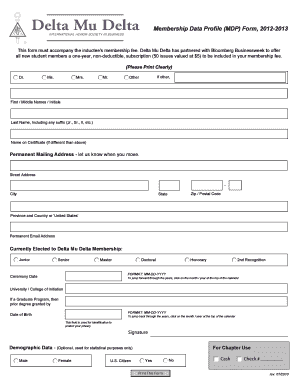
The Membership Data Profile (MDP) Form for the 2012-2013 academic year is a crucial document that assists in enrolling new members in Delta Mu Delta. This guide provides clear, step-by-step instructions to ensure that users can accurately and efficiently complete the form online.
Follow the steps to complete your Membership Data Profile (MDP) Form online:
- Begin by locating and pressing the ‘Get Form’ button to access the Membership Data Profile (MDP) Form. This will allow you to open the form for completion.
- In the section labeled 'Name', clearly print your title by selecting either 'Dr.', 'Mrs.', 'Ms.', or 'Mr.'. If your title is not listed, select 'Other' and specify your preferred title.
- Fill in your first, middle names or initials, and your last name, including any suffixes such as 'Jr.,' 'Sr.,' or 'II.' If the name on your certificate differs from your current name, please indicate that as well.
- Provide your permanent mailing address including the street address, city, zip or postal code, state, province, and country. Ensure you update this information if you move in the future.
- Enter your permanent email address. This will be used for communication regarding your membership.
- Select your currently elected membership level in Delta Mu Delta, which can be Junior, Senior, Master, Doctoral, Honorary, or 2nd Recognition.
- Specify your ceremony date in the format MM-DD-YYYY. You may click on the month/year at the top of the calendar to easily navigate to your intended date.
- Indicate the university or college of initiation. If you are part of a graduate program, please also provide the prior degree you were granted.
- Enter your date of birth in the format MM-DD-YYYY. This information is essential for identification purposes.
- This section requires your signature to complete the form. Please print clearly.
- Optional: Provide demographic data for statistical purposes, indicating your gender and U.S. citizenship status.
- In the final section, indicate whether this form is for chapter use and how you plan to pay your membership fee. You can select the payment method as cash or check.
- Once all fields are filled accurately, save your changes. You will have options to download, print, or share the form as needed.
Don't hesitate—complete your Membership Data Profile online today!