Loading
Form preview
  • US Legal Forms
  • Form Library
  • More Forms
  • More Uncategorized Forms
  • Cobra Election Form - Pcms - Carson Csudh

Get Cobra Election Form - Pcms - Carson Csudh

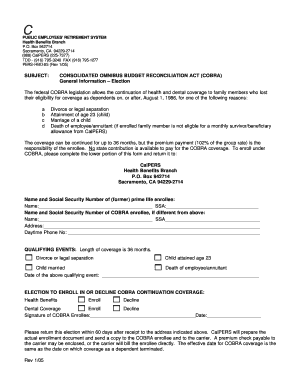
C PUBLIC EMPLOYEES? RETIREMENT SYSTEM Health Benefits Branch P.O. Box 942714 Sacramento, CA 94229-2714 (888) CalPERS (225-7377) TDD - (916) 795-3240 FAX (916) 795-1277 PERS-HBD-85 (Rev 1/05) SUBJECT:.

How it works

  1. Open form

    Open form follow the instructions

  2. Easily sign form

    Easily sign the form with your finger

  3. Share form

    Send filled & signed form or save

How to fill out the COBRA Election Form - PCMS - Carson Csudh online

This guide provides comprehensive instructions for completing the COBRA Election Form - PCMS - Carson Csudh. Whether you are new to this process or need a refresher, these steps will help you navigate the form with ease.

Follow the steps to successfully complete your COBRA Election Form.

  1. Press the ‘Get Form’ button to access the COBRA Election Form and open it in your preferred digital editor.
  2. Locate the 'Name and Social Security Number of (former) prime life enrollee' section. Enter the full name and social security number of the person who was the primary enrollee in the health benefits plan.
  3. If the COBRA enrollee is different from the prime life enrollee, fill out the 'Name and Social Security Number of COBRA enrollee, if different from above' section with the necessary information.
  4. Provide your current address in the designated field. This information is essential for communication regarding your COBRA coverage.
  5. Insert your daytime phone number in the appropriate field to ensure you can be contacted if necessary.
  6. In the 'QUALIFYING EVENTS' section, check all applicable boxes that pertain to your situation, indicating the reasons for your eligibility to elect COBRA coverage.
  7. Fill in the 'Date of the above qualifying event' field with the date when the qualifying event occurred.
  8. Move to the 'ELECTION TO ENROLL IN OR DECLINE COBRA CONTINUATION COVERAGE' section. Check the box to 'Enroll' for health benefits and dental coverage if you wish to continue with both services. If you do not wish to enroll, mark the 'Decline' option.
  9. Sign and date the form in the designated signature and date areas to validate your election.
  10. After submitting, keep a copy for your records, and wait for further instructions from CalPERS about your COBRA coverage.

Complete the COBRA Election Form online today to secure your health benefits.

Get form

Experience a faster way to fill out and sign forms on the web. Access the most extensive library of templates available.
Get form

Related content

bryant › bdd-chaining-files - Carnegie Mellon...
... carruthe carry carrye carson carsten carstens carswell cart carter cartohl carty...
Learn more

Related links form

UTSA Residency Application 2019 Undergraduate Request To Re-enroll To Temple University 2017 International Paper - Insurance Documentation 2019 NM Adjustment/Void Request 2017

Questions & Answers

Get answers to your most pressing questions about US Legal Forms API.

Contact support

If you are entitled to elect COBRA coverage, you must be given an election period of at least 60 days (starting on the later of the date you are furnished the election notice or the date you would lose coverage) to choose whether or not to elect continuation coverage.

Email: admissions@csudh.edu. Phone: (310) 243-3645.

Meet the Deadlines. You should get a notice in the mail about your COBRA and Cal-COBRA rights. You have 60 days after being notified to sign up.

What is the grace period for monthly COBRA premiums? After election and initial payment, qualified beneficiaries have a 30-day grace period to make monthly payments (that is, 30 days from the due date).

You can collect COBRA benefits for up to 18 months. This may be extended to 36 months under certain circumstances. If your employer has 20 or more employees, it must follow COBRA rules.

Certain events, such as layoffs, death and divorce, trigger eligibility for COBRA or CalCOBRA. The plan administrator must notify the employee and his/her covered spouse of their right to continue coverage within 44 days of the event, except during a legal separation or divorce.

CSUDH's highly respected College of Business Administration and Public Policy is a valuable business as well as educational asset offering excellent academic programs, business consulting and a range of community services.

It has a total undergraduate enrollment of 15,070 (fall 2021), its setting is suburban, and the campus size is 346 acres. It utilizes a semester-based academic calendar. California State University—Dominguez Hills' ranking in the 2022-2023 edition of Best Colleges is Regional Universities West, #56.

Get This Form Now!

Use professional pre-built templates to fill in and sign documents online faster. Get access to thousands of forms.
Get form
If you believe that this page should be taken down, please follow our DMCA take down processhere.

Industry-leading security and compliance

US Legal Forms protects your data by complying with industry-specific security standards.
  • In businnes since 1997
    25+ years providing professional legal documents.
  • Accredited business
    Guarantees that a business meets BBB accreditation standards in the US and Canada.
  • Secured by Braintree
    Validated Level 1 PCI DSS compliant payment gateway that accepts most major credit and debit card brands from across the globe.
Get COBRA Election Form - PCMS - Carson Csudh
Get form
  • Adoption
  • Bankruptcy
  • Contractors
  • Divorce
  • Home Sales
  • Employment
  • Identity Theft
  • Incorporation
  • Landlord Tenant
  • Living Trust
  • Name Change
  • Personal Planning
  • Small Business
  • Wills & Estates
  • Packages A-Z
  • Affidavits
  • Bankruptcy
  • Bill of Sale
  • Corporate - LLC
  • Divorce
  • Employment
  • Identity Theft
  • Internet Technology
  • Landlord Tenant
  • Living Wills
  • Name Change
  • Power of Attorney
  • Real Estate
  • Small Estates
  • Wills
  • All Forms
  • Forms A-Z
  • Form Library
  • Legal Hub
  • About Us
  • Help Portal
  • Legal Resources
  • Blog
  • Affiliates
  • Contact Us
  • Delete My Account
  • Site Map
  • Industries
  • Forms in Spanish
  • Localized Forms
  • State-specific Forms
  • Forms Kit
  • Real Estate Handbook
  • All Guides
  • Notarize
  • Incorporation services
  • For Consumers
  • For Small Business
  • For Attorneys
  • USLegal
  • FormsPass
  • pdfFiller
  • signNow
  • altaFlow
  • DocHub
  • Instapage
Form Packages
  • Adoption
  • Bankruptcy
  • Contractors
  • Divorce
  • Home Sales
  • Employment
  • Identity Theft
  • Incorporation
  • Landlord Tenant
  • Living Trust
  • Name Change
  • Personal Planning
  • Small Business
  • Wills & Estates
  • Packages A-Z
Form Categories
  • Affidavits
  • Bankruptcy
  • Bill of Sale
  • Corporate - LLC
  • Divorce
  • Employment
  • Identity Theft
  • Internet Technology
  • Landlord Tenant
  • Living Wills
  • Name Change
  • Power of Attorney
  • Real Estate
  • Small Estates
  • Wills
  • All Forms
  • Forms A-Z
  • Form Library
Customer Service
  • Legal Hub
  • About Us
  • Help Portal
  • Legal Resources
  • Blog
  • Affiliates
  • Contact Us
  • Delete My Account
  • Site Map
  • Industries
  • Forms in Spanish
  • Localized Forms
  • State-specific Forms
  • Forms Kit
Legal Guides
  • Real Estate Handbook
  • All Guides
Prepared for you
  • Notarize
  • Incorporation services
Our Customers
  • For Consumers
  • For Small Business
  • For Attorneys
Our Sites
  • USLegal
  • FormsPass
  • pdfFiller
  • signNow
  • altaFlow
  • DocHub
  • Instapage
Social Media
Call us now toll free:
+1 833 426 79 33
As seen in:
© Copyright 1999-2026 airSlate Legal Forms, Inc. 3720 Flowood Dr, Flowood, Mississippi 39232
  • Your Privacy Choices
  • Terms of Service
  • Privacy Notice
  • Content Takedown Policy
  • Bug Bounty Program