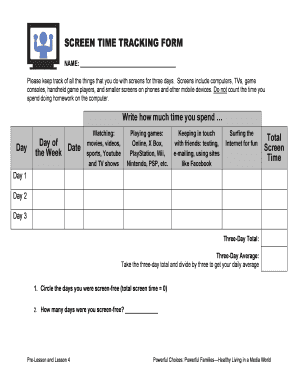
SCREEN TIME TRACKING FORM NAME: Please keep track of all the things that you do with screens for three days. Screens include computers, TVs, game consoles, handheld game players, and smaller screens.
Open form follow the instructions
Easily sign the form with your finger
Send filled & signed form or save
How to fill out the Screen Time Log Sheet online
The Screen Time Log Sheet is an essential tool for tracking your daily screen usage across various devices. This guide provides clear instructions for completing the form online, ensuring that you can efficiently record your screen time and analyze your habits.
Follow the steps to complete the Screen Time Log Sheet online.
- Press the ‘Get Form’ button to access the form in your online editor.
- Begin by filling in your name at the top of the form to identify your screen time record.
- Proceed to the section where you will track your activities for three days. For each day, input the corresponding date, day of the week, and allocate time spent on various activities including watching movies, playing games, keeping in touch with friends, and surfing the internet.
- At the end of each day, sum up your screen time across all activities to find the total for that day.
- After completing the three days, calculate the 'Three-Day Total' by adding each day’s total screen time. Use this to determine your 'Three-Day Average' by dividing the total by three.
- Make sure to circle any days you were screen-free, indicating a total screen time of zero, and record how many days this applied to.
- Once all sections are filled out, review the information for accuracy. You can now save your changes, download the completed form, or share it with others as needed.
Start tracking your screen time today by completing the Screen Time Log Sheet online!
Experience a faster way to fill out and sign forms on the web. Access the most extensive library of templates available.
Related content
If screen time for each person is less than 2 hours a day, you're doing great! If it's 2...
Tag a job, and that tag also applies to all of its entries. Create filters to control what...
Sheet music is a handwritten or printed form of musical notation that uses musical symbols...
Get answers to your most pressing questions about US Legal Forms API.
Can I access my child's screen time from my phone?
Compatible with Apple, Android and Amazon devices Screen Time is available for iPhone, iPad, iPod touch, Android and Kindle Fire.
What is a healthy screen time per day?
What's a healthy amount of screen time for adults? Experts say adults should limit screen time outside of work to less than two hours per day. Any time beyond that which you would typically spend on screens should instead be spent participating in physical activity.
How can I monitor my child's screen time at home?
Number of Devices You can monitor your child's screen time with third-party apps like Qustodio, Norton Family, or Net Nanny. Another option is to use the built-in parental controls on your device.
How can I monitor my child's screen time?
You can monitor your child's screen time with third-party apps like Qustodio, Norton Family, or Net Nanny. Another option is to use the built-in parental controls on your device.
Is there an app for parents to control kids screen time?
OurPact allows parents to foster healthy habits and manage their child's screen time using screen time allowance, blocking specific apps, blocking texts, and scheduling daily screen time ing to a child's daily routine.
Can I monitor my child's phone without them knowing?
Track My Child's Phone Without Them Knowing Using Android Device Manager. In case you need to monitor your child's Android-operated device, consider using Android Device Manager (AMD). It's a built-in tool by Google that allows tracking someone else's GPS location.
What does the CDC recommend for screen time?
Limit screen time to half an hour per week of educational or physical activity programming for children 2 years or older; no screen time for children younger than 2 years. Have water accessible and available throughout the day.
How long should an 11 year old have screen time?
Yousuf said pediatricians generally recommend the following guidelines: Under 2 years old: Zero screen time, except for video chatting with family or friends. 2-5 years old: No more than one hour per day co-viewing with a parent or sibling. 5-17 years old: Generally no more than two hours per day, except for homework.
Use professional pre-built templates to fill in and sign documents online faster. Get access to thousands of forms.
If you believe that this page should be taken down, please follow our DMCA take down process here.