Loading
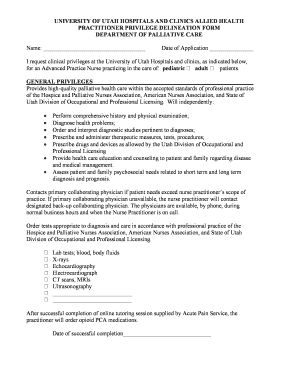
Get University Of Utah Hospitals And Clinics Allied Health Practitioner Privilege Delineation Form. Xml
How it works
-

Open form follow the instructions
-

Easily sign the form with your finger
-

Send filled & signed form or save
How to fill out the UNIVERSITY OF UTAH HOSPITALS AND CLINICS ALLIED HEALTH PRACTITIONER PRIVILEGE DELINEATION FORM. XML online
Filling out the University of Utah Hospitals and Clinics Allied Health Practitioner Privilege Delineation Form is an essential process for individuals seeking to obtain clinical privileges. This guide provides a clear and supportive approach to completing the form online, ensuring that users can navigate each section with confidence.
Follow the steps to successfully complete the privilege delineation form.
- Press the ‘Get Form’ button to access the form and open it in your editor.
- Begin by entering your name in the designated field provided at the top of the form.
- In the 'Date of Application' section, input the current date to indicate when you are submitting the form.
- Select the type of patients you are providing care for by checking the appropriate box for either pediatric or adult patients.
- In the 'General Privileges' section, review the listed capabilities. Acknowledge that you will provide high-quality palliative health care according to the standards set by relevant professional organizations.
- Fill in the specifics regarding your role, including performing comprehensive history and physical examinations, diagnosing health problems, and ordering relevant diagnostic studies.
- Indicate your ability to prescribe and administer medications as allowed by Utah guidelines in the section related to medication orders.
- Complete the area that addresses emergency care procedures you are prepared to initiate in line with ACLS standards.
- Address discharge planning activities, including referrals and communication with medical directors, if applicable.
- Finally, ensure you have signatures from all required parties in the approval sections, which include the collaborating physician, department head, chair of the medical board, and chair of the governing body.
- Once all sections are filled out, save your changes, and choose to download, print, or share the completed form as needed.
Complete your document online today to ensure you have the necessary privileges for your practice.
Sign in to the Azure portal and navigate to your app. From the left navigation, select Authentication > Add identity provider > Microsoft. Select the Tenant type of the app registration you created.
Industry-leading security and compliance
US Legal Forms protects your data by complying with industry-specific security standards.
-
In businnes since 199725+ years providing professional legal documents.
-
Accredited businessGuarantees that a business meets BBB accreditation standards in the US and Canada.
-
Secured by BraintreeValidated Level 1 PCI DSS compliant payment gateway that accepts most major credit and debit card brands from across the globe.