Loading
Get University Of Tennessee Records Management Department 5723 Middlebrook Pike Rm - Rmo Utk
How it works
-

Open form follow the instructions
-

Easily sign the form with your finger
-

Send filled & signed form or save
How to fill out the University Of Tennessee Records Management Department 5723 Middlebrook Pike Rm - Rmo Utk online
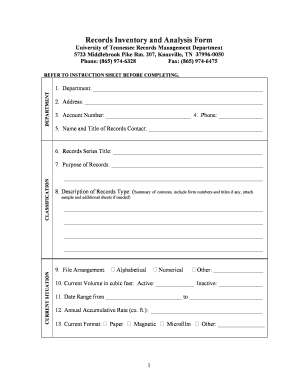
Completing the records management form for the University of Tennessee is a crucial step in maintaining organized and efficient records. This guide will provide you with clear, step-by-step instructions to help you fill out the form accurately and easily.
Follow the steps to accurately complete the records management form online.
- Click ‘Get Form’ button to obtain the form and open it in the editing interface.
- In the 'Department' section, enter the name of your department in the designated space. Be sure to provide accurate information for effective records management.
- Fill in the 'Address' field with the official address of your department. This is essential for records identification.
- Input your 'Account Number' clearly in the respective box to link your records to the appropriate account.
- Provide a contact phone number in the 'Phone' section for any necessary follow-up.
- Enter the 'Name and Title of Records Contact' to designate who is responsible for the records.
- In the 'Records Series Title' section, write the title that represents the series of records you are documenting.
- Explain the 'Purpose of Records' thoroughly. Describe the intent behind these records and how they serve your department.
- For the 'Description of Records Type', summarize their contents. Include any relevant form numbers or titles and attach additional sheets if necessary.
- Detail your 'Current Situation' related to the records as accurately as possible.
- Select the 'File Arrangement' from the options: Alphabetical, Numerical, or Other. Specify if you choose 'Other'.
- Provide the 'Current Volume in cubic feet' for both active and inactive records.
- Indicate the 'Date Range' that the records cover, from the start date to the end date.
- State the 'Annual Accumulative Rate' in cubic feet that reflects how records increase each year.
- Select the 'Current Format' of the records from the options Paper, Magnetic, Microfilm, or Other, and specify if necessary.
- Choose whether the records are 'Vital' and specify their status: Original, Confidential, or Duplicate, along with the location of the originals.
- Identify the 'Records Value' as Administrative, Legal (if legal, cite the statute or regulation), or both.
- Indicate if the records are subject to fiscal audit and specify whether it falls under federal regulations.
- In the 'Media Recommendations' section, determine how you wish to maintain the records: Current Format, Historical (Archival), both, or a format like Microfilm.
- Complete the 'Recommended Disposition' section, specifying cut-off periods and plans for record maintenance or destruction.
- Sign and date the form in the sections for 'Name of Person Taking Inventory' and 'Department Head' to validate the document.
- Once all fields are accurately filled, save changes, download, print, or share the completed form as needed.
Begin the process of managing your records by filling out the necessary documents online today.
The preferred method of delivery is electronic submission of official transcripts over a secure network from a service such as Parchment, National Clearing House, Digitary, or your institution's electronic delivery system. If using one of these services, please have transcripts delivered to gradtranscripts@utk.edu.
Industry-leading security and compliance
US Legal Forms protects your data by complying with industry-specific security standards.
-
In businnes since 199725+ years providing professional legal documents.
-
Accredited businessGuarantees that a business meets BBB accreditation standards in the US and Canada.
-
Secured by BraintreeValidated Level 1 PCI DSS compliant payment gateway that accepts most major credit and debit card brands from across the globe.