Loading
Get Ambulatory Sheet
How it works
-

Open form follow the instructions
-

Easily sign the form with your finger
-

Send filled & signed form or save
How to fill out the Ambulatory Sheet online
Filling out the Ambulatory Sheet online can streamline the process of documenting patient information and surgical details. This guide provides clear instructions on how to efficiently complete each section of the form.
- Click 'Get Form' button to access the Ambulatory Sheet and open it for editing.
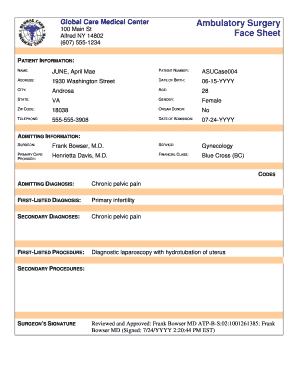
- Begin by entering the patient information in the designated fields. Include the full name, patient number, address, date of birth, city, age, state, gender, and ZIP code. Ensure accuracy as this information is crucial for identification and records.
- Specify if the patient is an organ donor and provide the telephone number. Additionally, enter the date of admission to the facility.
- In the admitting information section, fill out the surgeon's name, service provided, primary care provider, financial class, admitting diagnosis, first-listed diagnosis, and any secondary diagnoses. Be thorough as this data is essential for treatment planning.
- Detail the first-listed procedure and any secondary procedures that may be performed. This information will help in organizing surgical protocols and patient care.
- In the consent section, ensure that the patient authorizes the described operations and procedures. Review the explanation of risks, benefits, alternatives, and unforeseen conditions carefully. All queries should be addressed before proceeding.
- Gather signatures from the patient or their representative, along with a witness. Make sure that all blanks are filled out and any non-applicable sections are crossed out.
- Finally, review all entered information for accuracy. Once completed, you can save changes, download a copy, print the form, or share it as required.
Get started on your document management by completing the Ambulatory Sheet online today!
For CY 2023, CMS proposed to continue to assign HCPCS code P9099 to APC 9537 (Blood component/product NOC) and changed the cross walked HCPCS code from P9043 to P9060 (fresh frozen plasma, donor retested, each unit). This resulted in a payment rate increase of $7.79 to $56.58.
Industry-leading security and compliance
US Legal Forms protects your data by complying with industry-specific security standards.
-
In businnes since 199725+ years providing professional legal documents.
-
Accredited businessGuarantees that a business meets BBB accreditation standards in the US and Canada.
-
Secured by BraintreeValidated Level 1 PCI DSS compliant payment gateway that accepts most major credit and debit card brands from across the globe.